Exercise 2: Writing a New App With a New Preprocessor
In this exercise, you are tasked with adding a completely new feature—a zero-velocity update (ZUPT)!
Throughout this exercise, you will learn how to write and utilize a preprocessor in pntos-python.
All of the files in exercises/zupt_exercise will need to be modified in order for the ZUPT to be
properly utilized. To complete the exercise:
Modify the stubbed-out Preprocessor plugin to generate a new zero-velocity measurement.
Identify an off-the-shelf Cobra velocity measurement processor to use.
Update the stubbed-out app to use both 1 & 2.
Motivation
There are instances where a platform can be stationary but due to noise, misalignments, and other factors a filter can fail to understand the platform is fully stationary. This is where ZUPTs come in! A zero-velocity update is simply a message that informs the filter that the platform is not moving. This is a powerful tool because with minimal overhead it can be implemented to constrain drift that would otherwise occur without a perfect tuning of your sensors. If you really want some motivation, run the app in its current state! You will see a considerable amount of drift and the effects of a ZUPT will be blatant!
Design
Although a ZUPT could be implemented in a variety of ways this exercise requires that it is implemented as a preprocessor. Any design decision thereafter will be left up to you to make - meaning there is no singular “right” way to write the preprocessor. Any preprocessor that produces ZUPTs at appropriate times is a valid solution.
Dataset
Like with anything, information about the expected data can play a large part in making educated design decisions. Here is a page that describes the log, its channels, and other information about the log you may find useful.
In the app the STATIONARY_TIME_RANGES list contains pairs of timestamps relative to the start
time of the log. Each pair is a time range for a stationary period in seconds constructed like
(<start_time>, <end_time>). Each time is relative to the first timestamp in the log. For example,
the second pair is (1106, 1158) so there is a stationary period 1106 seconds into the log that
lasts for 52 seconds.
Verifying Solution
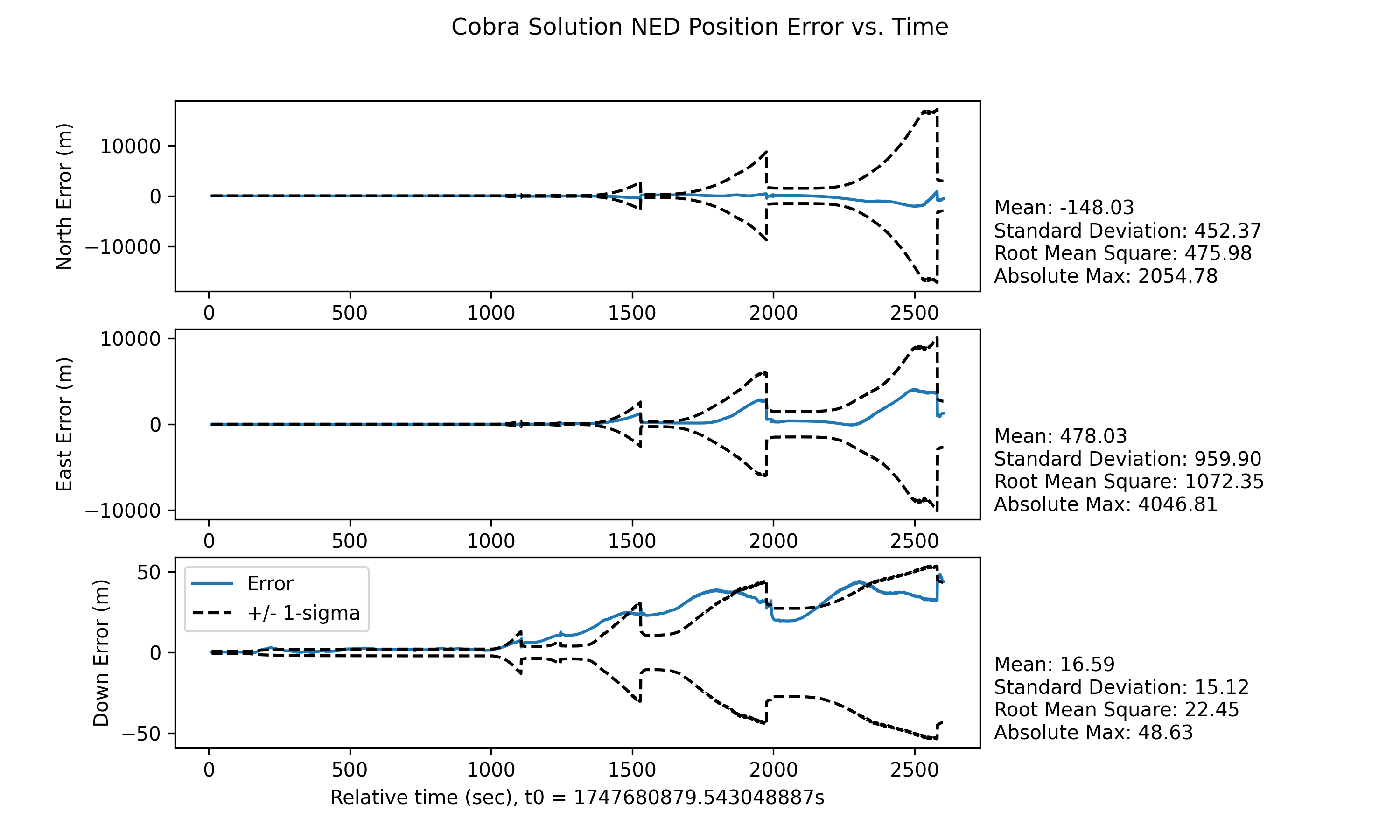
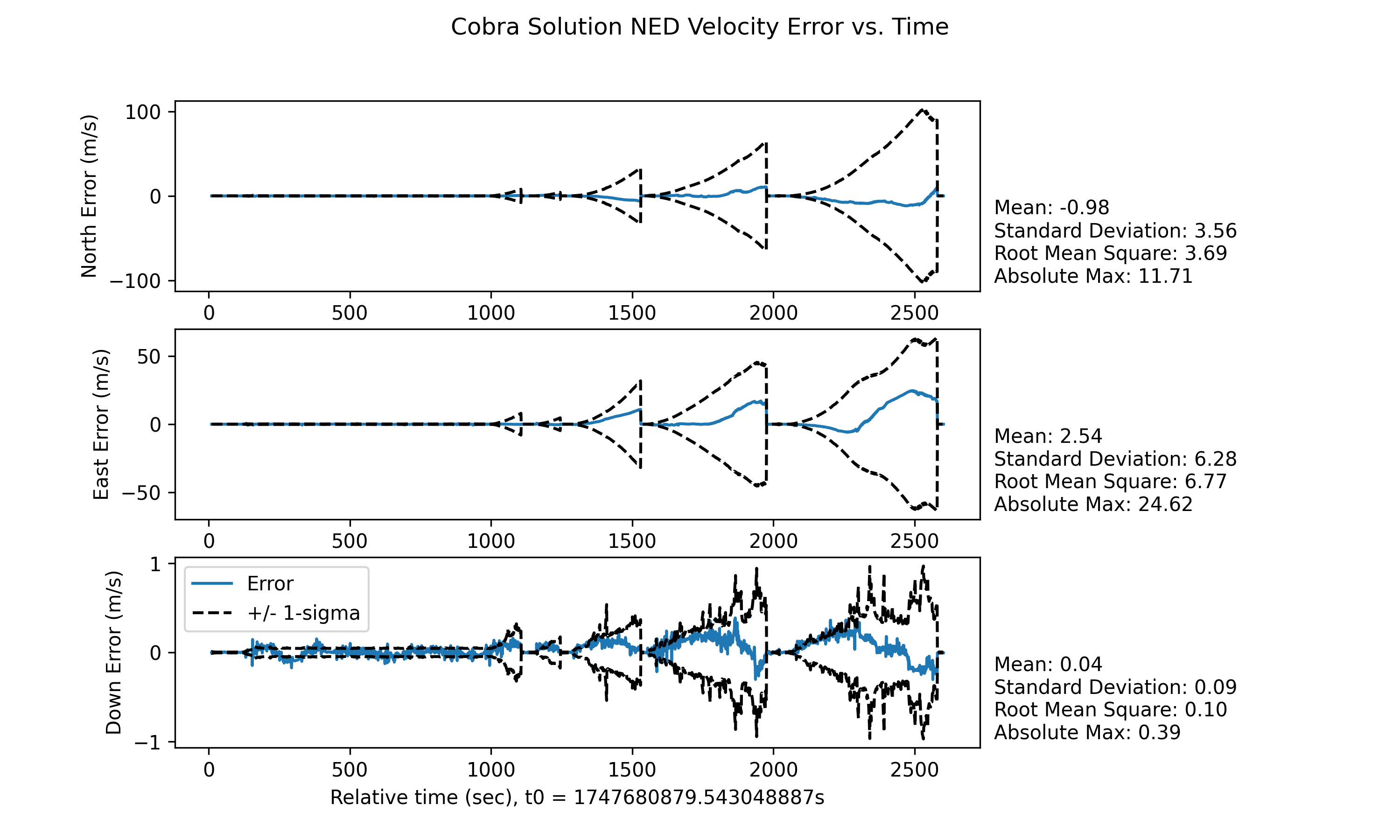
Since there is no one “right” way to write it, there is also no one “right” way to judge it either. Instead, we have provided the results from a nominal solution that own engineers wrote below. Feel free to compare our results to yours to see how they match up!
Helpful Tips
I don’t understand how to start solving the problem.
A considerable portion in any engineering problem is brainstorming a solution to the problem at hand. Your solution will be a function of your inputs, so the vital question is, “What information (inputs) do I need to produce a zero-velocity update?”. The answer will vary depending on how you solve the problem, but hopefully that question will help get you started. In any solution, though, that information will be relayed through config. You can take a look at the config other preprocessors require here.
I know how to solve the problem, but I am not sure how to implement my solution.
A common place to be! We recommend looking at one (or more) of the off-the-shelf preprocessors to get an idea of how they solve their respective problems.
How do I utilize the preprocessor after I’ve written it?
If you have already created your config and written your preprocessor, a lot of the hard work is done! Remember, all of the files in the exercise must be edited for adding a preprocessor to work. If you have already looked at the plugin but aren’t sure of what to do, take a look at our Preprocessor docs.
The app is already set up to use the ExercisePreprocessorPlugin, but is the new config you wrote
being used? Subsequently, how will the filter process the zero-velocity measurements?
Hint
There are off-the-shelf apps that process velocity measurements originating from the log (see the channel name). What source identifier do your messages have?
I have made all the necessary changes, but I am not seeing an improvement in results.
There are a few things this situation could mean:
The preprocessor isn’t actually being created/used. - try using the
Mediatorto log messages where important steps are such as in the preprocessor constructor or innew_preprocessor.There is no measurement processor being used to actually incorporate the ZUPTs into the filter. That or the measurement processor isn’t configured correctly. Check out the tip above for more info.
There is a logical error somewhere in your implementation which is unfortunately hard to help you with. Our recommendation is to use a debugger to pinpoint the issue. If that isn’t an option, even simple debug statements (whether via the mediator or just
print()) are always helpful to verify certain logic is being reached.
If you have tried and investigated all of the above suggestions, below is a hidden section that contains a step-by-step description of how our team solved this.
Click to reveal description of solution.
As mentioned above, there are many approaches to implement a ZUPT. Our team decided to implement a simplistic solution that produces ZUPTs during the pre-determined stationary time ranges.
Note
A more realistic example would infer the platform is stationary from messages passing through, such as the IMU messages. However, for the sake of simplicity, we elected to provide the stationary times and implement a solution that uses them.
By deciding upon a solution, we have also determined our config which consists of an array of stationary times.
Next, we implemented the preprocessor based on the description above with a few extra design decisions.
No messages that enter the preprocessor will be dropped.
ZUPTs will be produced at 1 Hz.
The source identifier of the ZUPTs will be hard-coded to
/preproc/simulated/zupt.
The constructor contains and stores parameters corresponding to the relevant config info. Then,
process_pntos_message() was written with the design described above.
Next, the PreprocessorPlugin was altered to provide this new preprocessor. Which includes:
Importing the necessary methods and classes such as the new config object, the
config_from_registryutility function, and the preprocessor itself.Updating the
preprocessor_identifiersfield to contain a unique name for the preprocessorUpdating the
new_preprocessormethod to:Validate the preprocessor index it received
Pull the config from the registry via
config_from_registryInstantiate the new preprocessor with the information required by its constructor and return it
Finally, the app itself was updated to use this preprocessor and process the measurements coming
out of it.
To add the preprocessor, we simply added its config to the list of preprocessor_configs on the
StandardOrchestrationConfig.
Next, we added an off-the-shelf measurement processor to incorporate the ZUPTs. To do this, we
imported the generic MeasurementProcessorConfig and filled out it’s required fields so that a
PinsonVelocityMeasurementProcessor would be returned and it would only process measurements from
our ZUPT preprocessor.
And that’s it! If you follow those steps correctly, you should end up with similar results to what
was posted above. But if you are still struggling, the solution is stored in
.details/zupt_exc_ans/.