Exercise 1: Writing a New App From Existing Cobra Plugins
This exercise is designed to be a beginner friendly interaction with the Cobra system. We recommend
you start with this exercise as you should develop a familiarity with apps, which is necessary to
setup and run an instance of pntOS-Python. In this exercise, a partial implementation of the app
you’ll write is at exercises/new_app_exercise/pos_baro_app.py. It already has an altitude update,
so your goal is to add a GPS position update to the stubbed-out app.
Motivation
The easiest way to motivate adding a GPS update is to run the app in its starting state and see the results yourself! They are less than sub-optimal and it’s clear the solution is useless in its current state. Unfortunately, a industrial-grade IMU and barometer can only go so far together, so this app is ripe for a geodetic 3D positional update via GPS.
Note
GPS is required for the alignment algorithm so the channel is already being read from the log. In
other cases, the LcmLogTransportConfig typically needs to be updated to process a new channel,
but in this case that is not necessary.
A Priori Information
Incorporating a new measurement typically requires some pertinent information that can only be obtained through prior understanding of the data collect or extensive examination of said data. These processes and skills are beyond the goal of this exercise, so listed below is important information that should be used in adding the GPS position update.
The positional offset (lever arm) between the GPS sensor and the platform is
(-0.50, 0.38, -0.05)There is no rotational offset (orientation) between the sensor and platform frame.
All Pinson positional measurement processors require inertial PVA auxiliary data.
Our implementation uses a first-order Gauss-Markov (FOGM) to model the
x,y, andztime-correlated positional sensor errors.The
3x1initial estimate are all zeros.The
3x3initial covariance is \(9 * I_{3\text{x}3}\)The
3x1\(\sigma\)’s are(1.5, 1.5, 2.0)metersThe
3x1\(\tau\)’s are(300, 300, 200)seconds
Note
When using the information above, be sure to provide the information as the expected type specified by the config.
Log Metadata
Here is a list of channels and some metadata on the log.
Verifying the Solution
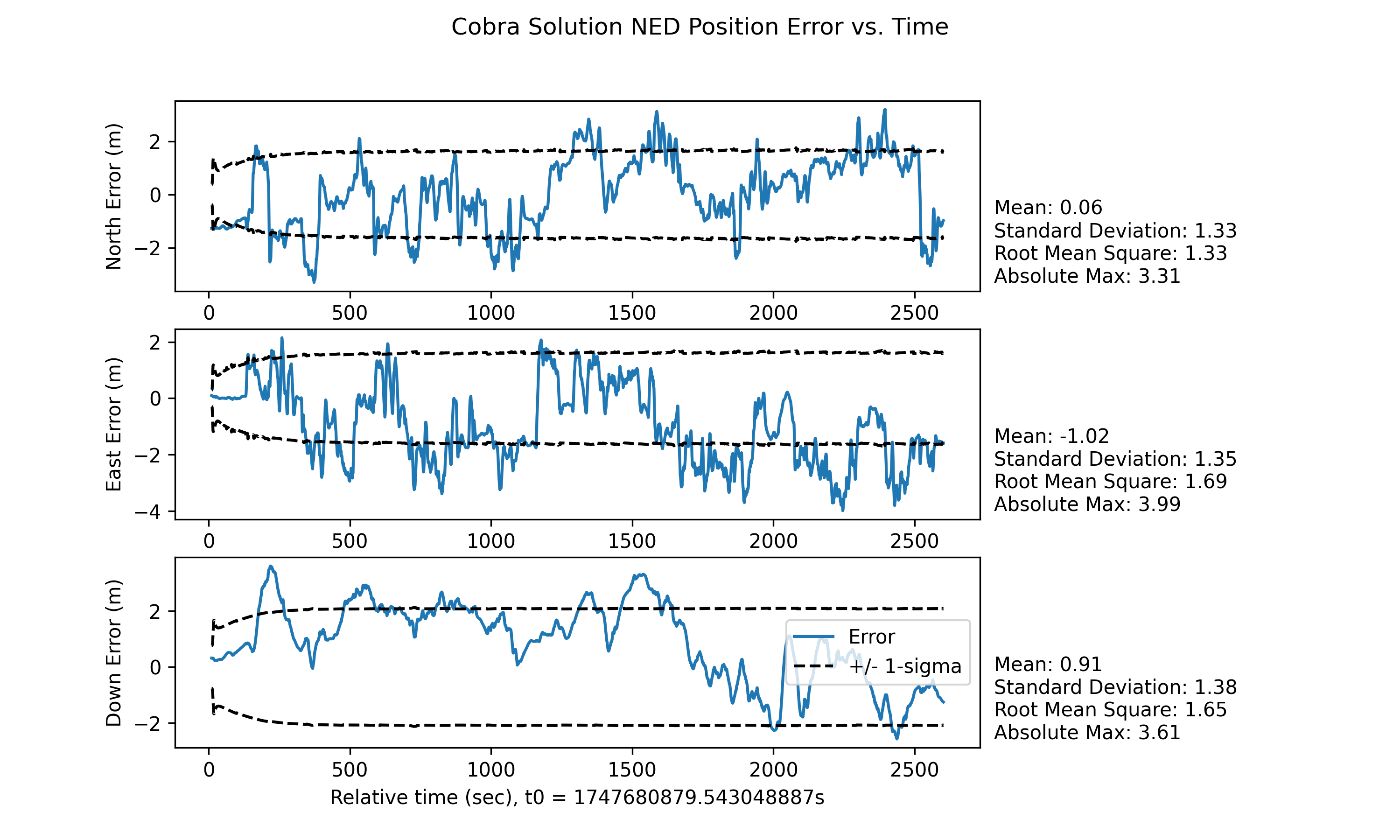
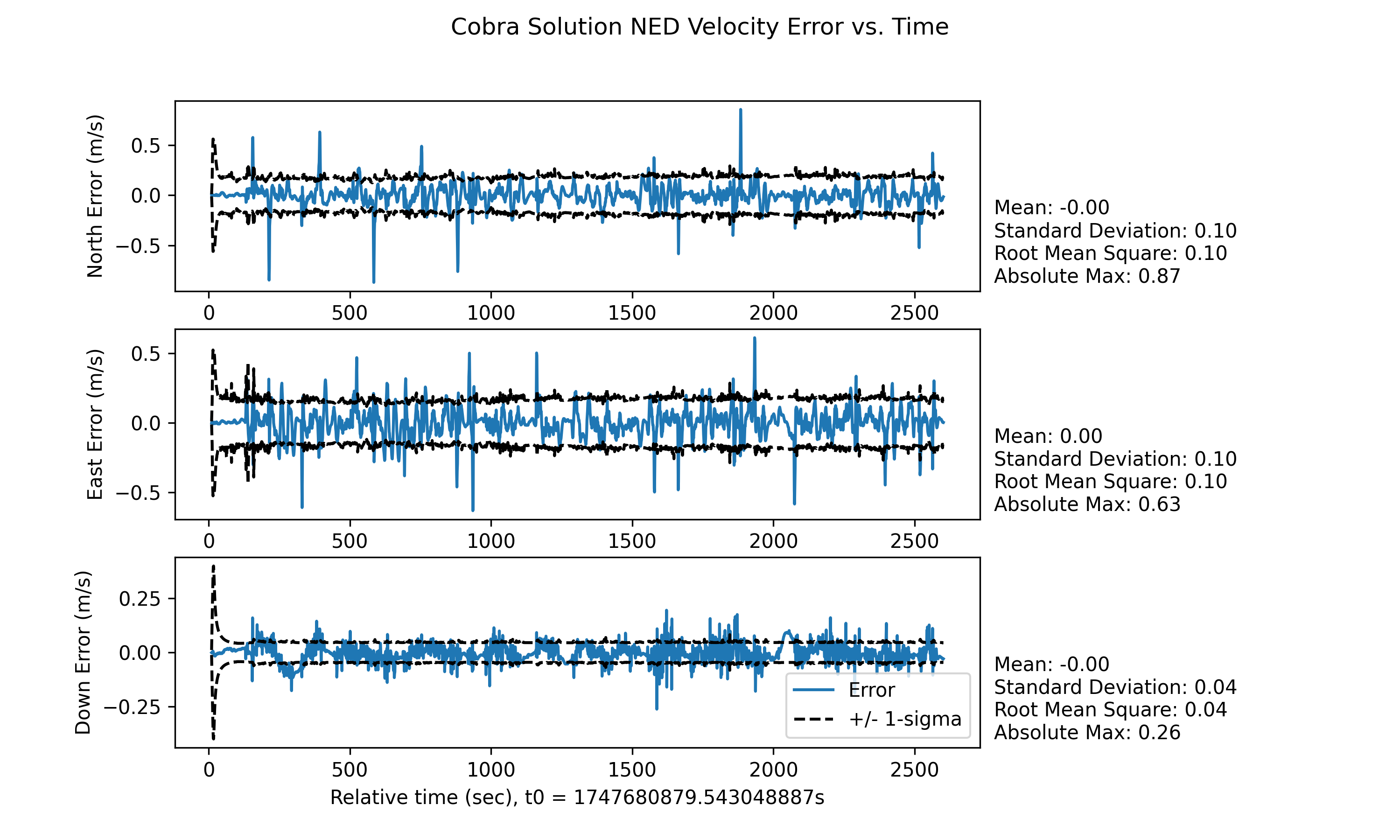
Although the change in solution quality should be obvious, we have included some plots below that your results should be similar to.
Helpful Tips
What is an app and how do I modify it?
If this is the position you find yourself in, we recommend you check out our primary documentation on the tutorial apps. This will walk through all the basics of an app and the follow-on tutorial will even describe how to change it.
I don’t know what is required to incorporate a new update.
In pntos-python, incorporating a new measurement involves updating a set of states as well as
relating the measurements to those states. While not one-to-one, incorporating the position update
is very similar to how we incorporate the altitude update. Use it as a reference while working
through this exercise.
Where do I find a list of measurement processors?
A list of available measurement processors can be found in the StandardStateModelingPlugin docs
on this page.
The corresponding identifier must be located in the source code
here
I believe I have added the necessary components, but the results don’t look the same.
There are many things that could cause this, so unfortunately the amount of help we can provide is limited. But, we have listed below the most common issues and what they might mean.
If your results improved significantly but the 1-sigma bounds are vastly different, you likely used
the pinson_position MP and not the pinson_with_ned_fogm_position. For all intents and purposes,
this is a valid solution. But if you would like for it to match, you will have to swap the MP and
possibly add a FOGM block if you have not already.
If your results didn’t improve or are still considerably different, this likely means you aren’t
ingesting the measurement-at least not appropriately. Check the additions you have made. Is the
channel name spelled correctly? Is the measurement processor config nested within the Orchestration
config appropriately? Are you using a SensorMeasurementProcessorConfig?
If pntOS won’t run to completion, there is an error in the config you have added or altered.
The most likely way this would happen is an invalid type was used in a config class, so validate
that the types you have put on the classes match the type hints. There are many other possibilities
that may cause this, so the best advice we can give is to closely examine the terminal output for
answers.
If you are still struggling, the next drop down contains a description of our solution. We urge you to not use this until you are finished with the exercise or are completely stuck and none of the above was helpful.
Click to reveal description of solution.
As hinted above, our solution uses the PinsonWithNedFogmPositionMeasurementProcessor to relate
the measurements to the state estimates. This MP requires a Pinson15 state block (which is
already in the app), a FOGM block to model the sensor errors, and inertial PVA aux data. To
accomplish the above we:
Added a
FogmStateBlockConfigtoStandardOrchestrationConfig.additional_sb_configsand used the relevant information from A Priori Information.Added a
SensorMeasurementProcessorConfigtoStandardOrchestrationConfig.mp_configsthat accomplishes the requirements described above by:processing the
/sensor/ublox-ZED-F9T/positionchannel.adding the Pinson block and new FOGM block labels to its
state_block_labelsfield.adding
'INERTIAL_PVA'to itsaux_channelsfield.using the information in A Priori Information to fill in other various fields.
If you find the above description hard to follow, our solution can be found at
.details/new_app_exc_ans/.