POS INS App
Caution
This section is only relevant to users who are working within the pntOS-Python repository. Downstream users will need to write their own apps to run. For help on building your own apps, see The Exercises
Welcome to the first of the Cobra tutorial apps!
Overview
A Cobra app consists of a single Python script which imports
plugins, instantiates plugins, sets config, and calls
take_control() on the controller
plugin to run the plugins.
This app is meant to be a simple demonstration of an app that accomplishes sensor fusion between two sensors. In this case it is the fusion between GPS position measurements and IMU readings using a simple set of Cobra plugins. Each subsequent app will build on the previous app(s) with a small tweak or expanded capability to walk you through the process of building increasingly complex sensor-fusion and navigation systems with pntOS-Python and Cobra.
App Walkthrough
Let’s walk through this first app piece by piece. You can find the first app file at
pntos-python/pntos-cobra-apps/src/pntos/apps/tutorial/pos_ins.py
to follow along. Let’s get started by examining how you import elements from the pntos module.
Imports
Assuming we’ve installed the pntos Python module, we can import
pntOS-Python or Cobra objects from a few different submodules within
the pntos module:
Submodule Location |
Available Imports |
|---|---|
|
All pntOS-Python objects |
|
All Cobra Plugins |
|
Non-plugin Cobra objects (e.g. |
|
Cobra utility and helper functions |
|
Cobra config objects and config utility functions |
Let’s look at how our app uses these locations:
API Imports
This app only uses a single import from the API. Most apps will require minimal API imports since the API is mostly relevant when implementing a plugin, not when using a plugin in an app.
In this case, we need to import the LoggingLevel enum
from the API:
6from pntos.api import CommonPlugin, LoggingLevel
This is used for initializing the global log level of the StandardLoggingPlugin later in the app:
139        StandardLoggingPlugin(
140            'Cobra Standard Logging Plugin',
141            global_log_level=LoggingLevel.INFO,  # Switch to `DEBUG` for more informative log output
142        ),
… and that’s it for API imports - now let’s move to the plugin imports.
Cobra Plugin Imports
You should only see plugin imports from the top-level of pntos.cobra. For instance,
check out where the app imports the following Cobra plugins:
 9from pntos.cobra import (
10    EkfFusionStrategyPlugin,
11    StandardControllerPlugin,
12    StandardFusionPlugin,
13    StandardInertialPlugin,
14    StandardLoggingPlugin,
15    StandardPreprocessorPlugin,
16    StandardRegistryPlugin,
17    TutorialInitializationPlugin,
18    TutorialLcmLogTransportPlugin,
19    TutorialPosInsStateModelingPlugin,
20    TutorialPosOrchestrationPlugin,
21    UiLogPlottingPlugin,
22)
Notice that each of the imports from pntos.cobra is a plugin as indicated by the
suffix of each object name. We’ll walk through what each of these plugins are doing
further along in Plugins Overview. For now, on to the config imports.
Cobra Config Imports
The
pntos.cobra.config
submodule contains Cobra config objects and a few utility functions relevant
specifically to these config objects. We’ll explore these more in the next section, but
for now we need the following config objects for this POS INS fusion app:
23from pntos.cobra.config import (
24    BaseConfig,
25    ControllerConfig,
26    FogmConfig,
27    FusionEngineConfig,
28    ImuConfig,
29    ImuRotatorConfig,
30    InertialConfig,
31    LcmLogTransportConfig,
32    ManualAlignmentConfig,
33    MountingConfig,
34    TimeAdjusterConfig,
35    TimeBiasConfig,
36    TutorialOrchestrationConfig,
37    UiLogPlottingConfig,
38)
Example Dataset
The pntos_python_datasets_lcm package provides the example LCM log used in this app, along with a
variable, EXAMPLE_LCM_LOG, which specifies the path to this log file. This input log contains the
ASPN measurements to be processed by the filter.
In contrast, OUTPUT_LOG specifies the filename of the LCM log to which the filter solution will be
recorded, along with all input measurements. This log can then be used to analyze the accuracy of
the solution. If this filename is not provided as a command-line argument, it defaults to
pntos_output.log.
39from pntos_python_datasets_lcm import EXAMPLE_LCM_LOG
40
41
42def main() -> None:
43    """Run the pos_ins app."""
44    OUTPUT_LOG = sys.argv[1] if len(sys.argv) > 1 else 'pntos_output.log'
Lets dive a little more into these config objects as we initialize them next.
Config Setup
In the Cobra config paradigm, the user initializes config objects with the desired config values in the app, and then the app passes these config objects into the Registry Plugin upon instantiation of the Registry Plugin. The Registry Plugin takes these config objects and unpacks them into any new registry at the specified group. Then, if a plugin wants to access config values, they simply pull these config objects out of the registry and access their fields.
To accomplish this, Cobra config objects all inherit from BaseConfig and are
dataclasses, which allows the
Cobra objects to use two important helper functions: config_to_registry and config_from_registry. These helper functions are what the registry
uses to unpack these objects into the registry at the specified group, and allows
plugins to retrieve config objects back from the registry.
Note
While these helper functions can make it appear that we are storing unsupported types
in the registry (see RegistryValueTypeUnion
for the supported registry types), the reality is that these utility functions unpack the
dataclass fields into types the registry does support. Thus, the config dataclasses only
support the types specified at the bottom of the config conventions.
The conventions also provide information on creating your own config dataclasses.
So, with that background, we can now understand what is happening next in the app:
 52    my_config: list[BaseConfig] = [
 53        LcmLogTransportConfig(input_file=EXAMPLE_LCM_LOG, output_file=OUTPUT_LOG),
 54        ControllerConfig(),
 55        FusionEngineConfig(),
 56        ImuConfig(
 57            group='config/inertial_state',
 58            accel_bias_sigma=(2.4e-3, 2.4e-3, 2.4e-3),
 59            accel_bias_tau=(300.0, 300.0, 300.0),
 60            accel_random_walk_sigma=(3.887e-6, 3.887e-6, 3.887e-6),
 61            gyro_bias_sigma=(2e-4, 2e-4, 2e-4),
 62            gyro_bias_tau=(500.0, 500.0, 500.0),
 63            gyro_random_walk_sigma=(9.9e-4, 9.9e-4, 6.7e-5),
 64        ),
 65        ManualAlignmentConfig(
 66            group='config/default/alignment',
 67            initial_pos_var=(0.1, 0.1, 0.1),
 68            initial_vel_var=(1e-3, 1e-3, 1e-3),
 69            initial_tilt_var=(5e-4, 5e-4, 5e-4),
 70            initial_accel_bias_var=(5.2e-3, 5.2e-3, 5.2e-3),
 71            initial_gyro_bias_var=(9e-6, 9e-6, 9e-6),
 72            initial_accel_bias=(-0.0023383, 0.00085563, -0.05412892),
 73            initial_accel_scale_factor=(0.0, 0.0, 0.0),
 74            initial_accel_scale_factor_var=(0.0, 0.0, 0.0),
 75            initial_gyro_bias=(-0.00160958, -0.00204483, -0.00267885),
 76            initial_gyro_scale_factor=(0.0, 0.0, 0.0),
 77            initial_gyro_scale_factor_var=(0.0, 0.0, 0.0),
 78            initial_pos=(0.6938996038254822, -1.4679920679462133, 225.493),
 79            initial_rpy=(
 80                -0.014713125594312194,
 81                -0.040718531449027706,
 82                0.06895795874629593,
 83            ),
 84            initial_time=1747680879.539799718,
 85            initial_vel=(0.0, 0.0, 0.0),
 86        ),
 87        MountingConfig(
 88            group='config/gp3d_state_modeling',
 89            lever_arm=(-0.50, 0.38, -0.05),
 90            orientation=(1.0, 0.0, 0.0, 0.0),
 91        ),
 92        InertialConfig(
 93            group='config/inertial',
 94            expected_dt=0.01,
 95            channels=('/sensor/vn-100/imu',),
 96            C_imu_to_platform=C_imu_to_platform,
 97            inertial_buffer_length=10.0,
 98        ),
 99        FogmConfig(
100            group='config/pos_sensor_error',
101            sigma=(1.5, 1.5, 2.0),
102            tau=(300.0, 300.0, 200.0),
103        ),
104        TutorialOrchestrationConfig(
105            position_channel='/sensor/ublox-ZED-F9T/position',
106        ),
107        TimeAdjusterConfig(
108            group='config/time_adjuster',
109            channels=('/sensor/vn-100/imu',),
110            expected_dt_nsec=int(0.01 * 1e9),
111        ),
112        UiLogPlottingConfig(
113            logfile=OUTPUT_LOG,
114            solution_channel='/solution/pntos/pva',
115            truth_channel='/sensor/ins-d/pva',
116        ),
117        ImuRotatorConfig(
118            group='config/imu_rotator',
119            C_imu_to_platform=C_imu_to_platform,
120            channels=('/sensor/vn-100/imu',),
121        ),
122        TimeBiasConfig(
123            group='config/time_bias',
124            channels=('/sensor/ublox-ZED-F9T/position',),
125            time_bias=int(0.15 * 1e9),
126        ),
127    ]
128    # End Config
Here we populate a list of config objects with initial values and assign them a group.
Normally some of these values (such as the ManualAlignmentConfig parameters) would be
estimated by an InitializationPlugin or
through some other mechanism, but for the sake of simplicity in this first app, these
values are hard-coded here and easy for us to see.
Note
Prepending the group name with config/* is good practice for these objects so that
other objects are less likely to interfere with these fields in the registry.
Here’s a brief description of what each config object is used for in this app:
Cobra Config Object |
Description |
|---|---|
Configuration for the LCM transport plugin, which reads messages from the configured input file and writes messages to the configured output file. |
|
Configuration for the controller plugin which includes the length of measurement buffers and the solution request rate. |
|
The error model of the inertial unit, including white noise (random walk) and a bias modeled as a First-Order Gauss-Markov (FOGM) process for each sensor. |
|
Configuration to manually align the inertial unit to the platform frame. |
|
Information about the GPS antenna’s relationship to the platform frame. |
|
Configuration for the inertial mechanization and buffering. |
|
Parameters used to model the FOGM error of the GPS position measurements. |
|
Configuration that defines the channels to use for alignment, mechanization, and fusion. |
|
Configuration for a preprocessor that corrects the timestamps of the example IMU measurements, ensuring a consistent delta-time between measurements. |
|
Configuration for the UI plotting plugin that defines the log file, and the truth and solution PVA channels to plot. |
|
Configuration for a preprocessor that corrects the rotation of the example IMU measurements, ensuring the measurements are in the correct frame. |
|
Configuration for a preprocessor that corrects for biased timestamps from the given channels. |
Now that we have our config set up in my_config, let’s look at instantiating our plugins.
Instantiate Plugins
Now we have everything we need to get our plugins running. All that’s left is:
Instantiate the controller plugin.
Generate a list of plugin objects we want this app to run.
Call
init_plugin()on the controller plugin.Hand the list of plugins off to the controller with
take_control().
1. Instantiate Controller Plugin
We can instantiate our controller plugin like so:
131 controller = StandardControllerPlugin('Cobra Standard Controller Plugin')
2. Generate List of Plugins
Next we can instantiate all the other plugins we want in this app and put them in a list:
132 plugins: list[CommonPlugin] = [
You’ll notice that all the plugins take in an identifier on init by Cobra convention in order to populate the
CommonPlugin.identifier field which all plugins
inherit. However, there are two plugins which take an extra input here at instantiation in this app:
Plugin |
Extra Arg |
Extra Arg Description |
|---|---|---|
|
Takes a global log level parameter to select which log levels to display. For more info, see Logging Plugin. |
|
|
Takes in a list of config objects on instantiation to populate new registries. For more information on registry plugins, see Registry Plugin. |
We’ll explore the roles of all these plugins in the app later in Plugins Overview, but for now since we’ve got a controller plugin and a list of instantiated plugins, let’s see how we start up the controller:
3. Call init_plugin on Controller
150 controller.init_plugin()
According to the API, init_plugin() is:
“A function that will be called by pntOS once and only once when it first initializes the plugin before any other functions on the plugin are called.”
Thus, before we can pass control off to the ControllerPlugin with take_control(), we need to call init_plugin(). For all non-controller plugins, we need to pass
in a Mediator object in init_plugin(), but since this is the controller we don’t need to
pass in any arguments.
4. Hand Off Plugins and Control to Controller Plugin
After controller.init_plugin(), we need only call
controller.take_control(plugins) to
pass our list of plugins over to the controller. From there, the
StandardControllerPlugin has control and
our POS INS fusion app is up and running!
Congratulations, you’ve just walked through your first Cobra app! In the next section we’ll look at a top-level overview of what each of the plugins in this app are contributing to the app.
Plugins Overview
For each plugin in this app, let’s explore briefly what it is and how it contributes to this app:
Cobra Plugin |
Contribution to App |
More Info |
|---|---|---|
Sets up communication between plugins by calling |
||
Prints |
||
A group-key-value store for data storage and communication between plugins within the app. |
||
Assembles the |
||
Provides the |
||
Performs the inertial mechanization on IMU measurements to provide the fusion engine with PVA solutions from the IMU. |
||
Provides the fusion engine to the |
||
Provides the fusion engine (from the |
||
Models the state of the filter with Pinson15 states by providing a |
||
Reads ASPN messages from an LCM log file and feeds these ASPN messages into the app as pntOS |
||
Plots the results of the Cobra PVA solution against a truth PVA from an LCM log file upon shutdown. |
Expected Results
For instructions of how to run this app, see Running Your First App. After running the app you should see the following results:
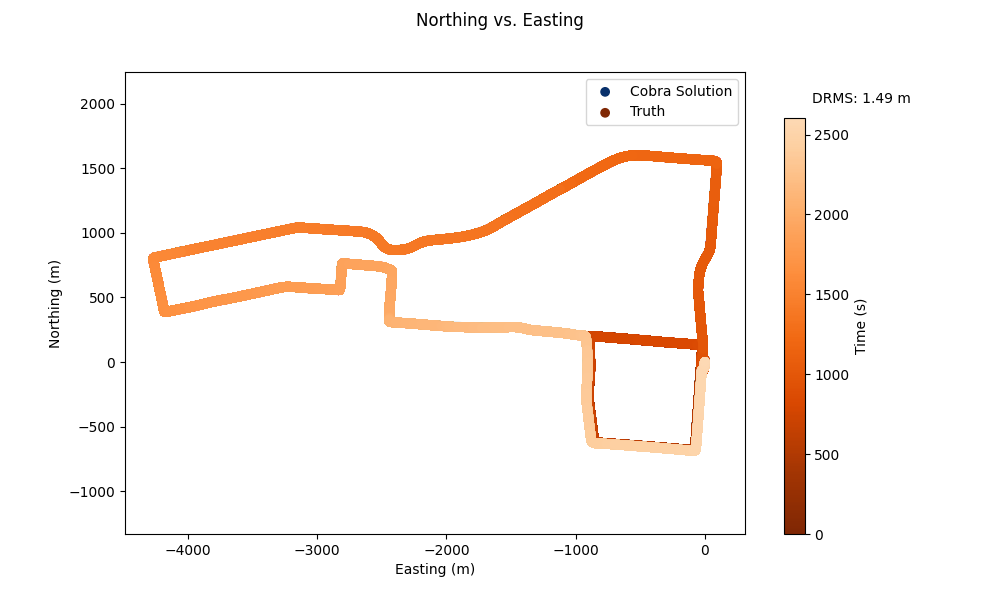
The Northing vs. Easting Trajectory plot which displays the INS-D PVA output and the Cobra PVA solution. It may be hard to tell, but they lie on top of one another, which is exactly what we want to see!
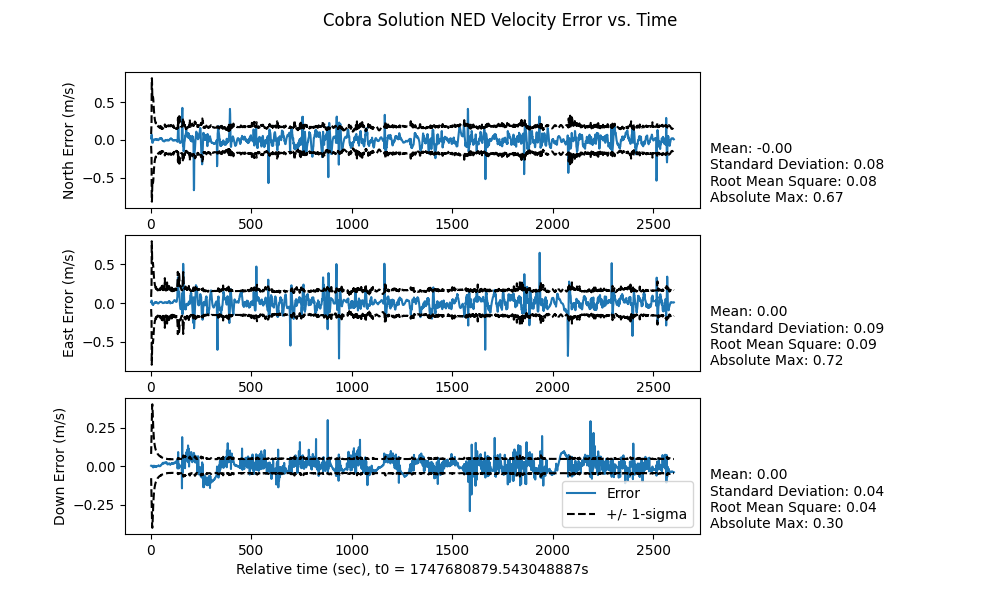
The NED Velocity Error plot which displays the velocity error between the INS-D PVA output and the Cobra PVA solution at each time epoch.