Registry Plugin
The Registry Plugin serves as a factory for
Registry objects which implement a group-key-value
registry available to all pntOS plugins via the
mediator. This plugin is useful for configuring plugins and
provides a way for plugins to share data.
API Overview
The registry plugin serves three primary purposes:
Loading config at startup and making it available to other plugins.
Storing runtime information.
Enabling inter-plugin communication when the API doesn’t provide a specific mechanism.
We’ll explore the mechanisms the Python pntOS API provides to accomplish these goals in this section, and then explore how Cobra implements the registry in the following section, Cobra Implementation: StandardRegistryPlugin.
Reference
The Python Registry Plugin API lives in
pntos-api/src/pntos/api/plugins/registry.py.
For the rendered documentation from this file, see pntos.api.RegistryPlugin.
Let’s start by looking at the fundamental database structure of the registry: the group-key-value store
What is a Group-Key-Value Store?
A group-key-value store is a database with top-level “groups,” where each group contains
key-value pairs. This is similar to a dictionary of dictionaries in Python. Consider
this example group-key-value data structure with groups "foo", "bar", and "baz":
group_key_value_store = {
    "foo": {
        "key1": True,
        "key2": 42,
    },
    "bar": {
        "key1": "Hello World!",
    },
    "baz": {
        "key1": 0,
        "key2": False,
        "key3": "test",
    },

}
Each top-level group contains key-value pairs. To access a value in this store, one
could call group_key_value_store[group][key]. For example,
group_key_value_store["foo"]["key1"] would return True. Group names must be unique,
and keys must be unique within each group (but not across groups). Value types can vary
within groups (see Supported Registry Types).
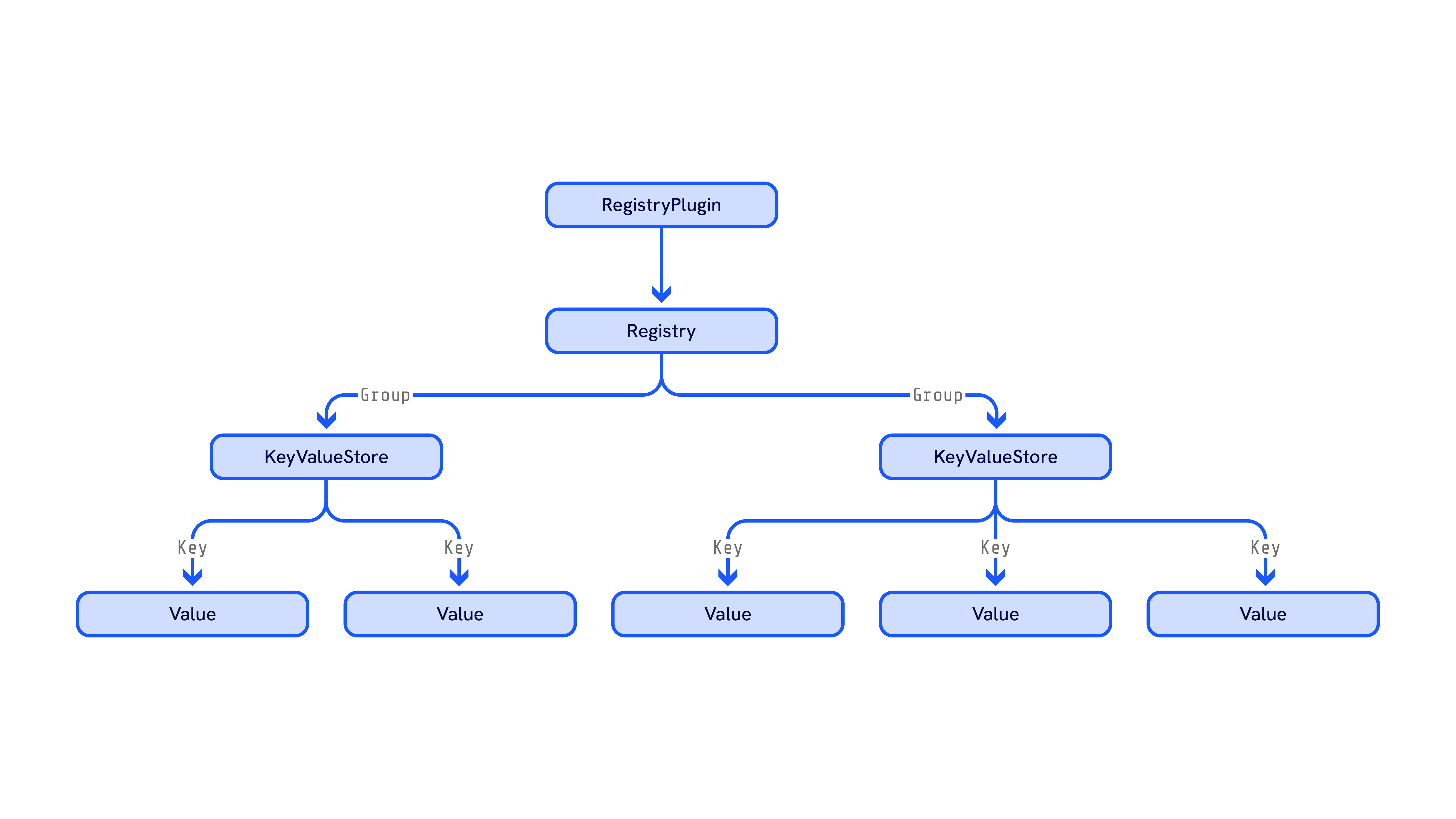
In the context of the Python pntOS API, “registry” refers to a shared database structure
as described above, implemented via the following objects. The Registry Plugin provides a Registry
object, and the Registry object provides a
KeyValueStore for each group which then provides the
value for each key:
Why use a group-key-value store instead of a simple key-value store? There are two main reasons:
Better organization
Concurrency considerations
For organization, each group can serve as a “topic” containing related data—for example, a “status” group might have keys such as “sensor_status” and “filter_status”. For concurrency, the group-key-value structure allows locking one group to one plugin at a time. We’ll explore this in detail in Concurrency and Batches, but for now, let’s see how to use the registry via the batch operations and getters/setters.
Batch Operations
Registry access always starts with
Registry.batch_start(group), which selects (or
creates) a group and returns a KeyValueStore. This
store contains all key-value maps in that group, and is guaranteed not to be modified by
other plugins until
KeyValueStore.batch_end() is called. Use
KeyValueStore.batch_restart() to
restart a batch operation on an existing store reference.
Example
kvstore = registry.batch_start("foo") # Acquire group "foo"
...                                   # Modify keys and values on kvstore
kvstore.batch_end()                   # Release "foo"

                                      # Cannot safely access "foo" until new batch

kvstore.batch_restart()               # Acquire "foo" again
...                                   # Safely modify "foo"
kvstore.batch_end()                   # Release "foo"
For a more in-depth look at the motivation for this batch design, see Concurrency and Batches. Now let’s examine how to read and modify the key-value maps in a store.
Getters and Setters
There are several ways to get and set keys and values in a
KeyValueStore. Assuming kv is a
KeyValueStore:
Method |
Getter/Setter |
Example |
Notes |
|---|---|---|---|
Setter |
|
Set a value for the given key. Accepts any |
|
Setter |
|
Python bracket notation for setting values. Equivalent to |
|
Getter |
|
Get a value with type specification. Returns |
|
Getter |
|
Python bracket notation for getting values. Returns value in its stored type (or as |
|
Getter |
|
Check if a key exists in the store. Enables Python’s |
|
Getter |
|
Get all keys in the store. Returns |
|
Getter |
|
Get all values in the store. Returns a |
|
Getter |
|
Get all key-value pairs. Returns an |
|
Getter |
|
Get the type of a value without retrieving the value itself. Returns |
|
Setter |
|
Remove a key and its value from the store. Returns |
|
Setter |
|
Python |
|
Setter |
|
Remove all keys and values from the store. |
|
Setter |
|
Set a value as raw bytes. Format must conform to |
|
Getter |
|
Get a value as raw bytes. Format conforms to |
Note the difference between __getitem__ and get_value:
kv = registry.batch_start("foo_group")
kv.set_value("bar_key", 42)
kv.batch_end()

kv.batch_restart()
val_ambiguous: RegistryValueTypeUnion | None = kv["bar_key"]
val_int: int | None = kv.get_value("bar_key", int)
kv.batch_end()
get_value lets you specify a return type,
while __getitem__ (bracket getter) can
return any registry type (or None if the key doesn’t exist). What types are allowed?
Supported Registry Types
The registry supports a specific set of Python types, defined by
pntos.api.RegistryValueType and pntos.api.RegistryValueTypeUnion.
Attempting to store unsupported types will result in errors.
The type RegistryValueType is a Python TypeVar
bound to the below types which is used when a method needs to guarantee that the input
type matches the output type (like
KeyValueStore.get_value). The type
RegistryValueTypeUnion is a union of the
below types and is used when methods don’t need this guarantee (like
KeyValueStore.set_value). For practical
purposes, both refer to the same set of types shown in the table below.
The following table lists all supported types with example values of those types:
Python Type |
Example |
Description |
|---|---|---|
|
|
Useful for configuration values, names, file paths, or any text data. |
|
|
Useful for multiple text values like lists of names, options, or identifiers. |
|
|
Useful for counts, IDs, flags, or any whole number values. |
|
|
Useful for on/off states, feature flags, or binary configuration options. |
|
|
Useful for measurements, ratios, or any decimal values. |
|
|
Useful for vectors, matrices, or large arrays of numerical data. Supports any number of dimensions[1]. |
|
Useful for storing ASPN messages or pntOS-specific message data. |
Below is an example of getting and setting all supported types.
# Setting values of various types in the registry
kvstore = registry.batch_start("my_data")
kvstore["name"] = "MyApp"                          # str
kvstore["sensors"] = ["GPS", "IMU", "Barometer"]   # list[str]
kvstore["count"] = 42                              # int
kvstore["enabled"] = True                          # bool
kvstore["temperature"] = 23.5                      # float
kvstore["position"] = np.array([1.0, 2.0, 3.0])    # NDArray[float64]
kvstore["newest"] = Message(aspn_msg, "sensor_1")  # Message
kvstore.batch_end()

# Retrieving values with type specification
kvstore.batch_restart()
name = kvstore.get_value("name", str)              # "MyApp"
sensors = kvstore.get_value("sensors", list)       # ["GPS", "IMU", "Barometer"]
count = kvstore.get_value("count", int)            # 42
enabled = kvstore.get_value("enabled", bool)       # True
temp = kvstore.get_value("temperature", float)     # 23.5
pos = kvstore.get_value("position", np.ndarray)    # np.array([1.0, 2.0, 3.0])
newest = kvstore.get_value("newest", Message)      # Message(aspn_msg, "sensor_1")
kvstore.batch_end()
While these are the only types directly supported in the registry, some implementations may provide means of converting other types into types that can be stored in the registry. For example, the Cobra config convention allows a specific superset of these types on the config dataclasses - all of which can be converted to/from types supported by the registry.
Note
Python doesn’t support passing Generic types as a type argument in isinstance(val, type). This is why you must pass in list and np.ndarray as type into get_value(key, type) instead of passing in list[str] or NDArray[float64], respectively.
Important
Only the types listed in the table above are supported. Attempting to store other types (like dictionaries, tuples, custom objects, etc.) is not supported. If you need to store complex data structures, consider:
Serializing them to a string (e.g., using JSON)
Breaking them into multiple registry entries
Using NumPy arrays for numerical data
Using
Messageobjects for ASPN-compatible data
Type Conversion
The registry can opt to implement some automatic type conversions when retrieving values. For example, a registry could choose to support storing a value as an integer and retrieve it as a string:
kvstore = registry.batch_start("conversions")
kvstore["count"] = 42  # Store as int
kvstore.batch_end()

kvstore.batch_restart()
count_str = kvstore.get_value("count", str)  # Retrieve as str, returns "42"
kvstore.batch_end()
However, for any conversions that are not supported, get_value will return None. It’s
best practice to store values in the type you intend to use them.
get_type
The KeyValueStore.get_type(key) method can
be used to request the type of a given key in the registry and will return None if
either the key does not exist or the type of the value at the key is not known.
If KeyValueStore.get_type(key) returns
None but the key does exist in the store, __getitem__ will only return str or
Message types
Callbacks
The registry API supports registering callbacks for:
New group creation.
Any key/value changes in a specific group.
Changes to a specific key in a specific group.
This lets plugins respond to registry changes asynchronously, avoiding polling.
Request Notify New Group
To be notified of new groups, pass a callback to
Registry.request_notify_new_group().
The callback takes a single string parameter (the new group name):
def my_new_group_callback(new_group: str) -> None:
    print(f"New group: {new_group}")

registry.request_notify_new_group(my_new_group_callback)
Request Notify on KeyValueStore
The KeyValueStore supports callbacks for any key/value
changes in a group, or for changes to a specific key. Callbacks must have these
parameters:
def my_callback(group: str, modified_keys: list[str], kvstore: KeyValueStore) -> None:
    ...
To register a callback, call
KeyValueStore.request_notify():
# Handles all modifications in a group
def my_general_callback(group: str, modified_keys: list[str], kvstore: KeyValueStore) -> None:
    print(f"Modified keys in group '{group}' (key: new_value):")
    for key in modified_keys:
        print(f"    {key}: {kvstore[key]}")

# Only handles when `my_key` changes
def my_specific_callback(group: str, modified_keys: list[str], kvstore: KeyValueStore) -> None:
    print(f"Key 'my_key' was changed to {kvstore['my_key']}.")

kvstore = registry.batch_start("my_group")
kvstore.request_notify(
    key=None, # Registers this callback for all keys in this group
    callback=my_general_callback,
)
kvstore.request_notify(
    key='my_key', # Callback only triggers when the value at 'my_key' changes
    callback=my_specific_callback,
)
kvstore.batch_end()
Use key=None to register a callback for all keys in the group, or key='<key>' for a
specific key.
In the above scenario, if another plugin were to set the following values in the registry:
kvstore = registry.batch_start("my_group")
kvstore["my_key"] = 5
kvstore["my_other_key"] = True
kvstore["yet_another_key"] = 0.7539
kvstore.batch_end()
When the two callbacks are triggered upon ending the batch operation, we would expect the following printout:
Modified keys in group 'my_group' (key: new_value):
    my_key: 5
    my_other_key: True
    yet_another_key: 0.7539
Key 'my_key' was changed to 5.
Callbacks don’t need to call batch_start() or
batch_end() because the
KeyValueStore passed to them is already a live batch.
To remove a callback, call
remove_notify():
kvstore = registry.batch_start("my_group")
kvstore.remove_notify(
    key='my_key',
    callback=my_specific_callback,
)
kvstore.remove_notify(
    key=None,
    callback=my_general_callback,
)
kvstore.batch_end()
Callbacks in a Concurrent Context
In order to perform reliably in a concurrent registry, a callback should:
Never try to directly access the mediator. This serves to limit deadlocks as outlined in Concurrency.
Attempt to return as quickly as possible. Ideally, a callback contains the minimal amount of code to save off changed values from the registry and return. Computation and response to the changed values would ideally be implemented outside of the callback.
Permanency
The registry API supports persistent data via
KeyValueStore.set_permanent().
Example
store: PntosKeyValueStore = registry.batch_start("group")
store.set_value("key1",1234.56) # does not tag this value as permanently stored
store.set_permanent(True)       # start tagging set calls as permanently stored
store.set_value("key1",987.65)
store["key2"] = 123             # both key1 and key2 values tagged
store.set_permanent(False)      # disable permanent storage
store.set_value("key1",456.78)  # key1 = 456.78 is value of key1 in store
store.batch_end()               # key1 = 987.65 tagged to be permanently stored
                                # key2 = 123    tagged to be permanently stored
Any setters used between set_permanent(True) and set_permanent(False) are tagged for
permanent storage. The implementation decides how to persist this data, allowing values to
survive across pntOS runtimes.
Accessing the Registry From Another Plugin
The registry can be accessed by any plugin through the
Mediator (received on
CommonPlugin.init_plugin) via the
Mediator.registry field:
class MyPlugin(UtilityPlugin):
    ...
    def init_plugin(self, plugin_resources_location, mediator) -> None:
        kvstore = mediator.registry.batch_start("my_config_group")
        config_val = kvstore["my_config_key"]
        kvstore.batch_end()
It is the responsibility of the Controller Plugin
to find a Registry Plugin in its list of plugins,
and give a Registry to all
Mediators.
Concurrency and Batches
The group-key-value structure enables safe concurrent access to the registry. Without concurrency control, it could lead to dangerous race conditions or undefined behavior. Consider this example showing a race condition in a simple key-value store without concurrency control:
Example: Race Condition Without Concurrency Control
Consider two plugins (Foo and Bar) that both track the maximum message timestamp. Each reads the current max, checks if their new value is greater, and updates if so. Without concurrency control, this read-check-write pattern can fail:
# Assume a pseudo-registry with simple get/set methods (NOT how pntOS actually works)
# Current registry state: max_time = 3.00

# Plugin Foo (Thread 1) receives message with timestamp 5.46:
current = registry.get("max_time")     # Reads 3.00
if 5.46 > current:
    registry.set("max_time", 5.46)     # Writes 5.46

# Plugin Bar (Thread 2) receives message with timestamp 4.76:
current = registry.get("max_time")     # Reads 3.00 (or 5.46, depending on timing)
if 4.76 > current:
    registry.set("max_time", 4.76)     # Writes 4.76
Race condition: If both threads read before either writes, this happens:
Foo reads
3.00Bar reads
3.00Foo writes
5.46Bar writes
4.76(overwrites5.46!)
Result: max_time = 4.76 (should be 5.46)
This demonstrates why the registry needs concurrency control mechanisms.
A simple key-value store without concurrency control isn’t robust. One solution would be locking the entire registry so only one plugin can access it at a time. This prevents race conditions but creates a bottleneck: in pntOS, the registry often passes large amounts of data between plugins at high rates across multiple threads or processes. A global lock limits throughput to a single thread’s speed.
The group-key-value format solves this: plugins can access unrelated information concurrently, with locking only when accessing the same group. This leads to the following rule:
Each group in the registry can only be accessed by one plugin at a time, but plugins may access separate groups concurrently.
Example
This means that if plugin “A” is reading and writing to keys in group "foo" but plugin
“B” also wants to read/write to keys in group "foo" at the same time, plugin B has to
wait for plugin A to finish before it can access "foo". However, if plugin B wants to
write to group "bar" when plugin A is writing to group "foo", there is no constraint
and both plugins can access their respective groups concurrently.
The pntOS registry enforces this via the Batch Operations described above. To see how batching solves the concurrency issue described in the race condition example, consider how the pntOS registry handles that scenario:
Example: How Batch Operations Prevent Race Conditions
Using the same scenario from the race condition example, here’s
how plugins Foo and Bar would track max_time using a pntOS registry with the group
"timing":
# Plugin Foo (Thread 1) with timestamp 5.46:
kvstore = registry.batch_start("timing")  # Acquire lock on "timing" group
current = kvstore.get_value("max_time", float)
if 5.46 > current:
    kvstore["max_time"] = 5.46
kvstore.batch_end()                       # Release lock

# Plugin Bar (Thread 2) with timestamp 4.76:
kvstore = registry.batch_start("timing")  # Blocks until Foo releases lock
current = kvstore.get_value("max_time", float)
if 4.76 > current:
    kvstore["max_time"] = 4.76
kvstore.batch_end()
How the race is prevented:
Foo acquires
"timing"group lockBar’s
batch_start()blocks, waiting for the lockFoo reads
3.00Foo writes
5.46Foo releases lock via
batch_end()Bar acquires lock
Bar reads
5.46(the updated value!)Bar’s condition fails (
4.76 > 5.46is false), so it doesn’t overwriteBar releases lock
Result: max_time = 5.46 (correct!)
The batch operations ensure atomicity: each plugin’s read-check-write sequence completes without interference.
With that understanding of the registry API including the registry structure, group access, supported types, concurrency implications, and other features, let’s explore a registry implementation.
Cobra Implementation: StandardRegistryPlugin
Let’s examine Cobra’s Registry Plugin
implementation and its key highlights.
Cobra’s Registry Plugin implementation is the
StandardRegistryPlugin which provides a
StandardRegistry and a
StandardKeyValueStore. These
implementations can be found in
pntos-cobra/src/pntos/cobra/standard_plugins/StandardRegistryPlugin.py
in the pntOS-Python repository.
Loading Config
Let’s examine how the Cobra registry loads config. As outlined in the config
documentation, Cobra provides
config_to_registry() to pack configs
into the registry, and config_from_registry()
to unpack them. Cobra loads config by passing all config dataclasses to the
StandardRegistryPlugin constructor:
def __init__(self, identifier: str, config: list[BaseConfig] | None = None) -> None:
Then it loads config into each new
StandardRegistry via
new_registry():
    def new_registry(self, initial_config: str | None = None) -> Registry:
        if initial_config is not None:
            self._log(
                LoggingLevel.ERROR,
                'initial_config parameter is unsupported by this '
                + 'implementation; ignoring values.',
            )
        out = StandardRegistry(self._log, self._plugin_resources_location)

        # Make a copy of the mediator so we can attach the new registry to it and pass both together
        # to config_to_registry without modifying our own mediator.
        mediator = copy(self.mediator)
        mediator.registry = out

        # Use input config from constructor
        for conf in self.config:
            config_to_registry(conf, mediator)

        self.registries.append(out)
        return out
While the registry plugin supports requesting an arbitrary number of registries, the Cobra implementation only requests one registry from this plugin, and shares this registry across all Mediators.
Note
Under the hood, config_to_registry() is
simply storing all fields on the dataclass in the registry as a set of key-value pairs.
For more information, see the Cobra config documentation.
The new_registry() implementation doesn’t use initial_config. Some implementations
might use this parameter if config is represented as a string, but Cobra’s config uses
BaseConfig objects passed through the constructor.
Note how StandardRegistryPlugin passes
self._log to the new StandardRegistry,
letting it log through the plugin’s mediator. This pattern continues when
StandardRegistry creates
StandardKeyValueStores.
new_registry() creates a mediator copy, assigns the new registry to it, and passes this
to config_to_registry(). This satisfies
the config utility’s mediator requirement without modifying the original mediator’s
registry property.
Group-Key-Value Implementation
As mentioned previously, the registry is
conceptually a dictionary of dictionaries. Thus, the Cobra registry is implemented using
this exact underlying data structure. The
StandardRegistryPlugin contains a
dictionary which maps groups to key-value stores:
groups: dict[str, StandardKeyValueStore]
And then the StandardKeyValueStore
contains a dictionary that maps keys to values:
_store: dict[str, RegistryValueTypeUnion]
This dictionary is what all
StandardKeyValueStore getters and
setters are accessing under the hood.
Batch Implementation
It is ultimately up to the Controller Plugin to implement any
concurrency model and enforce the batch behavior described in Batch Operations and
Concurrency and Batches, but Cobra’s
StandardKeyValueStore implements a
very simple mechanism to warn users when they are accessing the registry outside of a
batch operation. On
StandardRegistry.batch_start()
or
StandardKeyValueStore.batch_restart(),
the registry will first check the _batch_live flag on the
StandardKeyValueStore. If the flag
is set, it will log an error stating that the batch is already live. Otherwise it will
set the flag to True until the subsequent
batch_end() call.
Callbacks
The StandardKeyValueStore
implements the callback functionality described in Callbacks by maintaining a
dictionary that maps keys (or None for group-wide callbacks) to lists of callback
functions:
_callbacks: dict[None | str, list[Callable[[str, list[str], KeyValueStore], None]]]
When batch_end() is
called, callbacks execute in two phases:
Non-keyed callbacks (
key=None): Called once with all modified keys.Keyed callbacks (specific keys): Called once per callback with all its registered keys that were modified.
This minimizes redundant invocations when a callback is registered for multiple keys.
Permanency
The StandardRegistryPlugin implements
Permanency using Python’s pickle module to serialize permanent key-value pairs to
disk.
Permanency File Location
When a StandardKeyValueStore is
created, it determines the permanency file path based on the plugin_resources_location
parameter:
If
plugin_resources_locationis provided:{plugin_resources_location}/{group_name}.pklIf not provided:
./registry_permanency_files/{group_name}.pkl(the default directory defined byDEFAULT_PERMANENCY_DIR)
Each group has its own pickle file for independent persistence.
Loading Permanent Keys on Initialization
On initialization, the StandardKeyValueStore
checks for a permanency file. If it exists, the pickled dictionary is loaded into
_store, restoring all permanent keys:
if self._permanency_file.exists():
    with self._permanency_file.open('rb') as file:
        self._store = pickle.load(file)
else:
    self._store = {}
Permanent keys are immediately available without special retrieval logic.
Tracking and Saving Permanent Keys
The StandardKeyValueStore maintains
a set of permanent keys:
_permanent_keys: set[str]
When set_permanent(True) is called, subsequent set_value() or __setitem__() calls
add the key to _permanent_keys.
When batch_end() is
called, if there are permanent keys, the implementation:
Creates a dictionary of permanent keys and their current values
Serializes it to the permanency file using
pickle.dump()Resets
_set_permanenttoFalse
The permanency file always contains all permanent keys with their latest values,
overwritten on each batch_end() when _permanent_keys is non-empty.
Type Conversion Implementation
As described in Supported Registry Types, the registry stores a limited set of
types. Implementations may support type conversions when calling get_value(key, type)
with a different type than stored. For example:
kv.set_value(key, 3.14) # set as a float
str_val = kv.get_value(key, str) # request it as a string
print(str_val) # If the implementation supports it: "3.14"
However, not all type conversions are likely to be supported:
kv.set_value(key, 3.14) # set as a float
str_val = kv.get_value(key, Message) # No meaningful conversion from float to Message
print(str_val) # None
Click a type tab to see the supported get_value() request types for a value of that type
stored in the Cobra registry:
Requested Type |
Supported |
Example |
|---|---|---|
|
✅ |
|
|
✅* |
|
|
✅* |
|
|
✅* |
|
|
❌ |
- |
|
❌ |
- |
Requested Type |
Supported |
Example |
|---|---|---|
|
✅ |
|
|
❌ |
- |
|
❌ |
- |
|
❌ |
- |
|
✅* |
|
|
❌ |
- |
Requested Type |
Supported |
Example |
|---|---|---|
|
✅ |
|
|
✅ |
|
|
❌ |
- |
|
✅ |
|
|
✅ |
|
|
❌ |
- |
Requested Type |
Supported |
Example |
|---|---|---|
|
✅ |
|
|
✅ |
|
|
✅ |
|
|
✅ |
|
|
✅ |
|
|
❌ |
- |
Requested Type |
Supported |
Example |
|---|---|---|
|
✅ |
|
|
✅ |
|
|
❌ |
- |
|
❌ |
- |
|
✅ |
|
|
❌ |
- |
Requested Type |
Supported |
Example |
|---|---|---|
|
❌ |
- |
|
✅ |
|
|
❌ |
- |
|
❌ |
- |
|
❌ |
- |
|
❌ |
- |
Requested Type |
Supported |
Example |
|---|---|---|
|
❌ |
- |
|
❌ |
- |
|
❌ |
- |
|
❌ |
- |
|
❌ |
- |
|
❌ |
- |
Note: Conversions marked with ❌ are not supported by the StandardRegistryPlugin. Attempting these conversions will log a warning and return None.
Value-Dependent Conversions (*)
Conversions marked with * are value-dependent and may fail:
str → int: Only succeeds if the string represents a valid integer (e.g.,
"42"works, but"hello"or"3.14"fail and returnNone)str → bool: Uses Python’s
bool()constructor, which returnsTruefor any non-empty string andFalsefor empty strings. Important: This meansbool("False")returnsTrue! This conversion may not behave as expected for string values like"False","false","0", etc.str → float: Only succeeds if the string represents a valid float (e.g.,
"3.14"or"42"work, but"hello"fails and returnsNone)list[str] → np.ndarray: Only succeeds if all string elements can be parsed as floats (e.g.,
["1.5", "2.5"]works, but["hello", "world"]fails and returnsNone)