Introduction
Motivation
Many position, navigation, and timing (PNT) systems are stovepipe systems that are designed for a specific configuration of sensors to solve a particular PNT need. However, reliance on PNT in industry is evolving rapidly, and GNSS-challenged environments are becoming more commonplace. Complementary PNT approaches mitigate these limitations, but changing current PNT systems is a slow and expensive process.
The pntOS application programming interface (API) is designed to address this
situation. It has broken up the concept of a PNT sensor fusion system into its
component pieces (called plugins) and defined an API to standardize their interactions,
allowing for plugins to be individually swappable. In order to aid development of new
plugins, the pntos-python repository provides not only a
full Python API, but also a set of plugins and
Apps to serve as a reference implementation (called Cobra).
Source Code Breakdown
This project consists of the following main parts:
Component name |
Location within the project |
Description |
|---|---|---|
pntOS-Python Architecture Application Programming Interface (API) |
|
Defines a set of plugins and how they are to interact. |
|
Implementation of API - functional Python plugins and helper objects. |
|
|
Each app loads a set of Cobra plugins, defines any config values, and starts the plugins. |
While pntOS is analogous to an operating system in terms of its comprehensive scope, it is not a true operating system in the sense of a kernel. For more information, see Is pntOS an operating system?.
High Level Overview of pntOS-Python
At the top-level, pntOS-Python is an API that defines a set of plugins that collectively: accept sensor data from various sensors, perform sensor fusion on the sensor data, and finally produce a resulting navigation solution. This concept is illustrated below, with an example experimental setup where a pntOS-Python implementation is receiving and processing data from three sensors and producing a fused navigation solution:
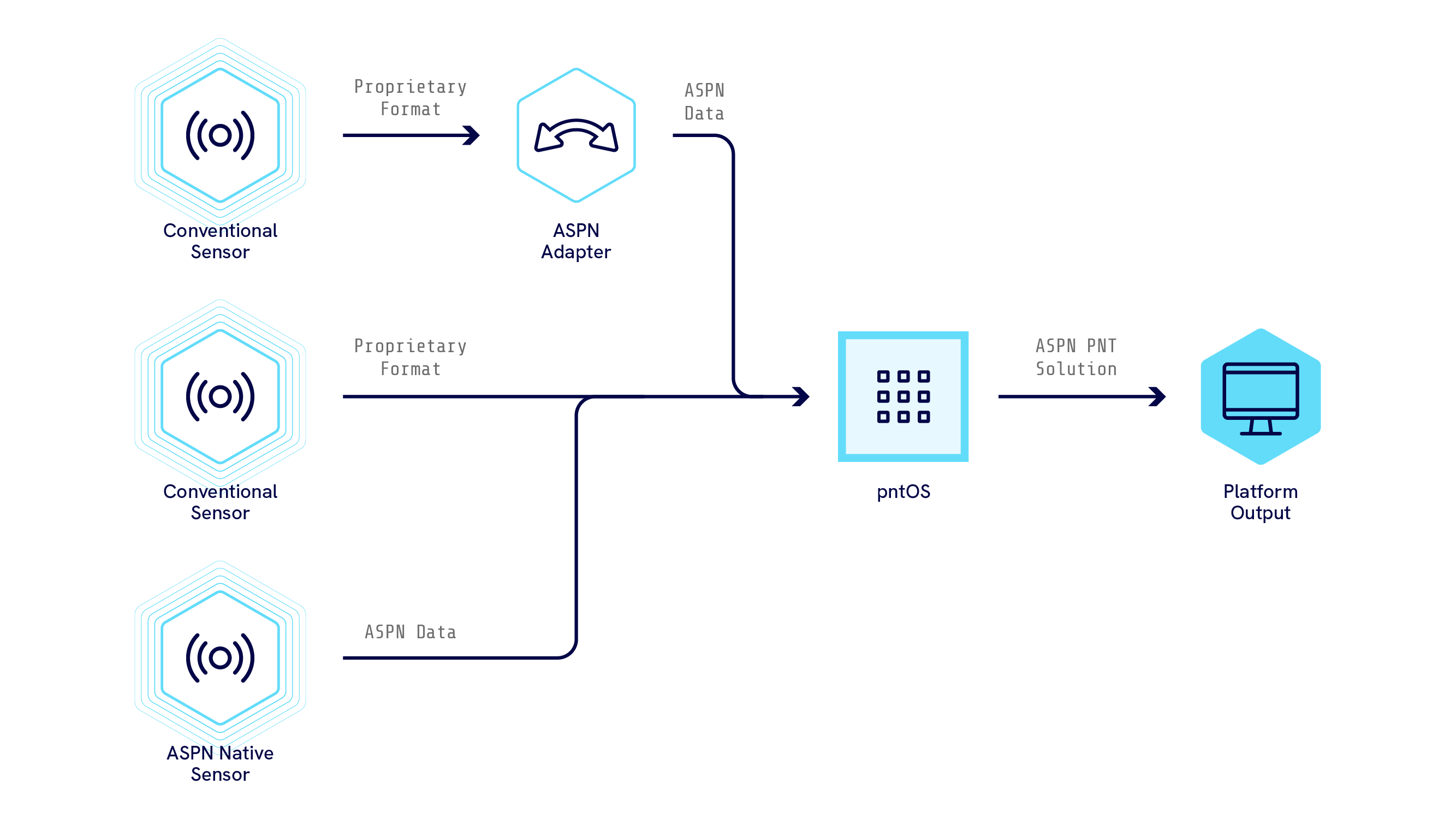
In this example, the data comes from the three sensors on the left and is processed by a set of pntOS-Python plugins; These plugins then produce a solution on the right. Data from all three sensors are accepted by the plugins, even though some of the data is in proprietary formats and some of it is in ASPN. This is because the pntOS-Python architecture accepts both ASPN and non-ASPN data from sensors, and will operate in a heterogeneous environment where both ASPN and non-ASPN sensor data is available.
Note
All navigation data used internally by pntOS-Python plugins must be ASPN-formatted (with exceptions made for truly exceptional use cases); thus, the cleanest way to send data into a pntOS-Python implementation is in the ASPN format, as shown by the “ASPN Native Sensor” in the figure. However, most sensors do not output ASPN data natively, and such non-ASPN sensor data needs to be converted to ASPN before it can be used by pntOS-Python plugins internally. This conversion can happen in two places:
In-between the sensor and the pntOS-Python implementation, by using an ASPN adapter that intercepts the data and converts it to ASPN, as shown by the top sensor in the above figure.
pntOS-Python defines a plugin called the Transport Plugin, which is designed to accept non-ASPN sensor data off the wire and convert it to ASPN for use by the other pntOS-Python plugins. The middle sensor in the figure above sends proprietary sensor data directly into the pntOS-Python implementation, so its data would need to be converted into ASPN by a Transport Plugin inside the implementation. We’ll learn more about the Transport Plugin and how it converts incoming data to ASPN in the tour of pntOS-Python.
Now that we’ve covered the top-level objectives of pntOS-Python, we will shift gears and take a brief tour of pntOS-Python, walking through a pntOS-Python system and examining how the pntOS-Python architecture decomposes the “sensor data in, sensor fusion solution out” problem into a set of isolated plugins.
A Tour of pntOS-Python
The pntOS-Python black box in the figure from the previous section is really a collection of plugins that are utilized by an app, as shown here:
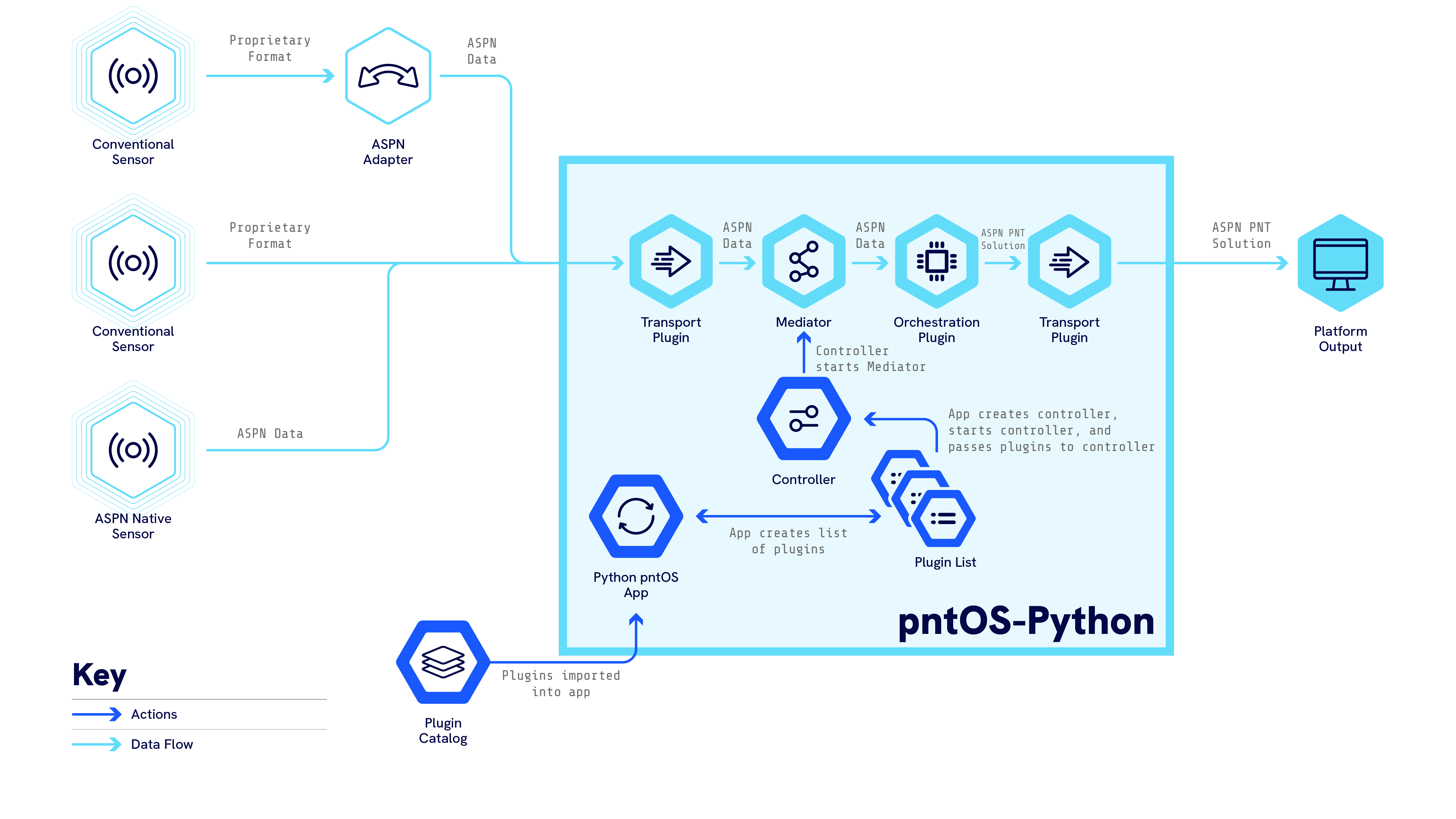
In this tour, we will dive into the details of how one would go about implementing each of the components of pntOS-Python in the above figure, examining each part of pntOS-Python piece by piece and discussing how we would create a pntOS-Python solution from start to finish. We will start at the bottom of the figure with the App (which is the entry point into any pntOS-Python system) and work our way through the control flow. In particular, in this section we will walk through how:
The App kickstarts the system, then transfers control to the
Controller Plugin, passing it a list of plugins to use.The
Controller Plugintakes in the list of plugins and wires them up to be able to communicate with each other via theMediator.The
Transport Pluginreceives data off the wire from a sensor, then delivers that data to theMediator.The
Mediatorroutes the sensor data it receives from theTransport Pluginto theOrchestration Plugin.The
Orchestration Pluginreceives the sensor data and processes it into a solution, then makes the PNT solution available to anyone who callsOrchestrationPlugin.request_solutions().
The App
All pntOS-Python solutions start with an App. In pntOS-Python terminology, an App consists of a single Python script that the user may run and produces a working pntOS-Python system. In general, the App is responsible for:
Importing the desired pntOS-Python plugin definitions (from Cobra or elsewhere)
Defining any initial config, either from inline structs or from a config file
Creating an instance of a controller plugin
Creating a list of instances of other plugins to pass to the controller, as desired
Calling
ControllerPlugin.take_control()on the controller plugin we created in3.to start the system. The controller plugin is passed in the list of the other plugins we created in4., and it is now responsible for setting up the system using them. OnceControllerPlugin.take_control()is called, the App’s job is done, and theController Plugincoordinates the pntOS-Python system going forward.
Note
One way to think of an App is that it is a simple Python script that kicks off the system, finds the plugins and
config that we want to use, then hands off control to the Controller Plugin.
The Controller Plugin is the conceptual “main” function of pntOS-Python,
in that ControllerPlugin.take_control() is where the plugins are
wired up to talk to each other, told to start listening and processing data, and so forth.
Most apps will look very similar to each other, with the only changes being which plugins the App has decided to use and what config stanzas it needs. You can find an example of a full-fledged App that performs POS/INS sensor fusion from sensor data it receives from an LCM network bus here. For instructions on how to run this example app, see Running Your First App.
A Very Simple App
For the purposes of this tour, suppose we defined an app that used three plugins of the following types:
Plugin Type |
Description |
|---|---|
Orchestration Plugin |
A plugin that is given sensor data and produces a solution (i.e. via sensor fusion internally) |
Transport Plugin |
A plugin that listens for sensor data from a network and converts it to ASPN format (if needed) |
Controller Plugin |
A plugin that receives all the other plugins and takes over control from the App |
Note
Most pntOS-Python implementations will also require a registry and logging plugin, but those are excluded here for brevity.
We might write our app like this:
#!/usr/bin/env python3

from pntos.api import CommonPlugin

# Import Cobra plugins and config structs
from pntos.cobra import (
    DummyControllerPlugin,
    DummyOrchestrationPlugin,
    DummyTransportPlugin,
)


def main() -> None:
    """Run the minimal app."""
    # Instantiate all of our plugins
    controller = DummyControllerPlugin('Cobra Dummy Controller Plugin')
    plugins: list[CommonPlugin] = [
        DummyTransportPlugin('Cobra Dummy Transport Plugin'),
        DummyOrchestrationPlugin('Cobra Dummy Orchestration Plugin'),
    ]

    # Start the controller
    controller.init_plugin()

    # Give the controller control, and pass it the list of other plugins
    controller.take_control(plugins)


if __name__ == '__main__':
    main()
…and thats it! Once our App calls
my_controller.take_control(), passing in
the other_plugin_list as the plugins parameter, our app is done. The rest of the work is done
inside the ControllerPlugin implementation, which is the
next stop on our tour.
Understanding the Controller Plugin
Once the App has called ControllerPlugin.take_control(),
the Controller Plugin is
responsible for all activity in the app going forward. The Controller Plugin
has one method on it called take_control(), so implementing
that method is all that is needed to fully implement a Controller Plugin.
Thus, we will turn our attention towards what is required to implement
the take_control() method.
As a parameter, take_control receives a list of
plugins that it is supposed to use to set up the pntOS-Python system. For example, our
Controller plugin might receive this list of plugins:
plugins: list[CommonPlugin] = [
as described in the last section.
Our task in implementing the take_control() method is
to write some code that takes those four plugins that were passed in as parameters and create a PNT fusion
system out of them.
Let’s suppose we wanted to start with the simplest possible implementation of
take_control(). In this case, we have two plugins to work with: A
Transport Plugin, which produces sensor data from the
network, and an Orchestration Plugin, which
consumes sensor data and produces PNT solutions. Then the implementation of
take_control() would ideally set up a pipeline that looked like this:
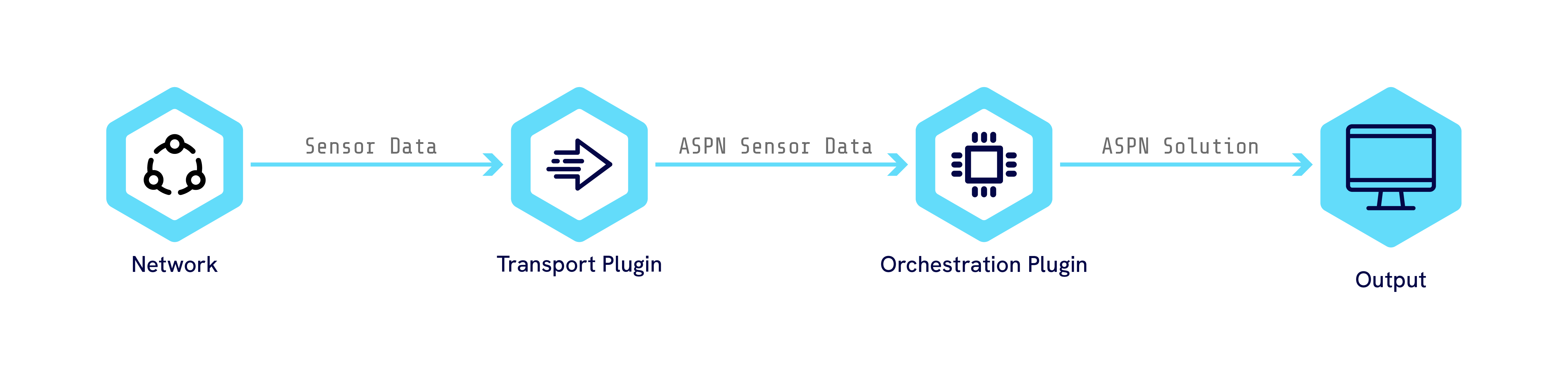
To set up that chain of data flow, the take_control() method
would need to perform the following steps in order:
First call
init_plugin()on both the Transport and Orchestration plugins before using them (more on why we need to do this in a minute).Tell the Transport plugin to start listening to its network bus, by calling
start_listening().Take the ASPN sensor data received from the Transport plugin and send it to the Orchestration plugin’s
process_pntos_message()via the mediator, processing it into a solution.Call the Orchestration plugin’s
request_solutions(), which asks theOrchestration Pluginto return the PNT solution it has computed by utilizing all previously received data from step 2.
Note
A few other necessary chores are omitted here for brevity.
Step 1 is relatively straightforward, since we have the Transport plugin
in our hand (it was passed in as a parameter) and we can directly call the
start_listening() method on it. Similarly,
Step 3 is relatively straightforward, as we have the my_orchestration
in our hand (it was passed in as a parameter) and we can directly call the
request_solutions() method on it. However,
Step 2 requires us to receive data from the Transport Plugin so that
we can pass it into the Orchestration Plugin’s
process_message(). How do we do that?
The answer lies in the mediator, and the init_plugin() call in Step 0
that we overlooked.
The Mediator and init_plugin
In pntOS-Python, plugins do not ever directly communicate with each other. Instead, when the
Controller Plugin receives a list of plugins as a parameter to its
take_control() method, the first thing the
Controller Plugin does is pass each plugin in the list a
Mediator, by calling each plugin’s
init_plugin() method and passing in the
Mediator as a parameter. Each plugin is then required to save off the
Mediator it was passed, and use it for all communications with other plugins going
forward. Understanding how the Mediator works is vital to understanding the pntOS-Python
architecture, as all data that pass from one plugin to another flows through it.
Note
One way to think of the Mediator is that it is a “communications object”. Every plugin is handed a communications object when it first starts, and from then on that plugin should use the communications object for all interactions with any other pntOS-Python plugin.
Note
Mediators are so named because they implement the computer science mediator design pattern concept. They represent an abstraction of the middleware between plugins, and allow plugins to be used in a variety of concurrency models (multi-threaded, single-threaded, coroutines, distributed computing, etc.) without the plugin knowing or caring how communications between plugins is actually being implemented. While the inversion-of-control that comes with using a Mediator pattern adds complexity, it is necessary to support swappable/pluggable concurrency models.
Because the design of pntOS-Python is such that all plugins must communicate with other plugins via the
Mediator, that means that our previous figure actually should look like:

That is, the Transport Plugin cannot directly send data to the
Orchestration Plugin, but instead must send the data into
the Mediator, and it is the Mediator’s job
to route that data to the Orchestration Plugin.
That brings us back to the question: How do we implement Step 2 of the
take_control() task list? Our goal is to receive the data
that the Transport Plugin receives off the wire, so we can send it
into the next stage. In order to understand how to do that, it would be helpful to fully understand
how the Transport Plugin
is implemented and how it delivers data to its Mediator. Thus,
let’s take a detour and look at how a simple Transport Plugin
is implemented, and then, armed with that knowledge, we’ll return to Step 2 of the
take_control() method.
Understanding the Transport Plugin
A Transport Plugin has one primary purpose: receive sensor data from
a sensor and deliver it into its Mediator, for consumption or routing to other
plugins.
How a Transport Plugin collects data from the sensor or network is totally arbitrary
and depends on the nature of the sensor data.
For example, one transport plugin might listen to an ethernet connection for data streaming over DDS or LCM.
Another transport plugin might listen to a local serial device or UART.
Yet another transport plugin might simulate data,
or replay it from a log file, and not even connect to a physical network at all.
Note
Transport plugins are actually bi-directional bridges, translating sensor data into a pntOS-Python system as well as sending data back out onto the network bus. We’ll skip the outward direction for brevity in this tutorial.
Whatever the source of the sensor data is, a Transport Plugin is required to convert it into ASPN before
sending it on to its Mediator. If the source data is already in ASPN format,
great! In this case, the Transport Plugin simply acts as a transparent
network bridge, marshaling data from the source of choice into the mediator without needing to convert
from a non-ASPN to an ASPN format.
The Transport Plugin has three methods of interest for the purposes of
this tour:
init_plugin()method, which it inherits fromCommonPlugin. This is used to receive theMediatorfrom the controller, and is guaranteed to be called before any of its other methods.TransportPlugin.start_listening(), which is called by the controller when thisTransport Pluginshould start listening to its data source.TransportPlugin.stop_listening(), which is called by the controller when thisTransport Pluginshould stop listening to its data source.
Thus, a simple example implementation of a Transport Plugin
might do the following:
Implement
init_plugin()as a method that simply saves off theMediatorit is passed.Implement
TransportPlugin.start_listening()as awhileloop that collects sensor data from a log file, simulation source, or dummy data set and sends it into theMediator.Implement
TransportPlugin.stop_listening()as setting a boolean that interrupts thewhileloop inTransportPlugin.start_listening().
So, how does the while loop in
TransportPlugin.start_listening()
send data into the Mediator? Let’s take a look at the methods available
on the Mediator for the Transport Plugin
to call. The Mediator
has a lot of fields on it for things like logging, config, and so forth. But the one of interest to us
here is Mediator.process_pntos_message(message).
The docstring reads:
        Send a new message to the system for arbitrary processing.

        For example, this function is useful for plugins who have just received new
        sensor data that they wish to relay to the system to be used in a sensor fusion
        solution.
If we look at the type of the parameter that
Mediator.process_pntos_message(message)
accepts, we see that it is a pntos.api.Message, which is defined as:
A container for an ASPN message.
Which looks like exactly what we need. In short:
Every plugin has an instance of
Mediatoravailable to it, passed to it via a call to itsinit_plugin()method.Every
Mediatorhas aprocess_pntos_message(message)method on it, which accepts delivery of new sensor data to the system from a sensor data source (such as a transport plugin).
We now have enough information to implement the while loop in
TransportPlugin.start_listening():
for each piece of sensor data we receive, convert it to an ASPN-Python message, wrap the ASPN-Python message
in a pntos.api.Message by calling its constructor and passing in the ASPN-Python
message, then pass the pntos.api.Message into
Mediator.process_pntos_message(message). The sensor data
will now be delivered to the Mediator and the
Transport Plugin can move on to the next sensor data in its loop (or
go back to waiting for data from the wire, for networked Transport Plugins).
A Dummy Transport Plugin Example
The DummyTransportPlugin is designed to be the simplest possible
implementation of a Transport Plugin possible to demonstrate the concepts
above, which is why it was chosen as the transport for our simple app example.
The source code of the DummyTransportPlugin can be
found here.
We can see from the source that it is very similar to the simple approach we’ve described above, namely it:
Saves off its
Mediatorin itsinit_plugin()method.Implements the
TransportPlugin.start_listening()as awhileloop that sends an all-zeros dummy data set into theMediator.Implements
TransportPlugin.stop_listening()as a boolean that interrupts thewhileloop inTransportPlugin.start_listening().
While this transport is not suitable for navigation (it just sends sensor data filled with zeros), it serves as a concrete example of a transport plugin that delivers data into the mediator.
Note
You’ll see in the implementation of start_listening in DummyTransport that a new thread is created
to send in the zeros. This is because pntOS-Python requires that plugins do not block on pntOS-Python system threads.
Since start_listening was called by the pntOS-Python system, it is not ours to block, and so the DummyTransport
creates its own thread to spin in a busy loop and call the mediator. For more information, see the
page on Concurrency in pntOS-Python.
Back to the Controller
In the previous section, we explored how the transport plugin delivered sensor data into its
Mediator. Recall that in the The Mediator and init_plugin section,
we decided that the data flow we wanted to support was this:
Also recall that in the Understanding the Controller Plugin section, we outlined our implementation
of the take_control()
method as the following four steps:
First call
init_plugin()on bothmy_transportandmy_orchestrationplugins before using them.Tell
my_transportto start listening to its network bus, by callingmy_transport.start_listening().Take the sensor data received from
my_transportand send it tomy_orchestration’sprocess_pntos_message(), which accepts ASPN sensor data and processes it into a solution.Call
my_orchestration’srequest_solutions(), which asks theOrchestration Pluginto return the PNT solution it has computed by utilizing all previously received data from Step 2.
At the time, we knew how to implement Steps 1 and 3, but didn’t understand how to implement Step 2.
Now we come back armed with knowledge of how the Transport Plugin delivers its data into the
Mediator.process_pntos_message(message) method
of the Mediator it received in its
init_plugin() method. So, in order for our controller
to receive data from my_transport and route it to
my_orchestration, we need to:
Define and implement a
MediatorobjectIn the implementation of the
Mediator’sprocess_pntos_message(message)method, forward all messages that are received tomy_orchestration’sprocess_pntos_message()Pass the newly defined
Mediatorinto bothmy_orchestration’s andmy_transport’sinit_plugin()method
And thats it! we’ve now set up a pipeline that forwards all data received by a
Transport Plugin into the
Orchestration Plugin.
A Dummy Controller Plugin Example
The DummyControllerPlugin is designed to be a simple implementation
of a Controller Plugin to demonstrate the concepts
above, which is why it was chosen as the controller for our simple app example.
The source code of the DummyControllerPlugin can be
found here,
along with its DummyMediator
here.
We can see from the source code that the DummyMediator
is similar to the approach we’ve described above, namely:
In the
take_controlimplementation, the controller first callsinit_pluginon each plugin before using them, which is our Step 0 above:# Initialize each plugin. for plugin in self._mediator.plugins: plugin.init_plugin(mediator=DummyMediator(plugins))
In the
take_controlimplementation, the controller tells all the transport plugins to start listening, which is our Step 1 above:# Tell the Transport plugin to start listening. for plugin in self._mediator.plugins: if isinstance(plugin, TransportPlugin): plugin.start_listening()
The implementation of
DummyMediator.process_pntos_messagesearches through its list of plugins for the Orchestration plugin and then passes messages received from the transport plugin into the orchestration plugin’sprocess_pntos_message, which is our Step 2 above:# Find the Orchestration plugin and pass it the message. for x in self.plugins: if isinstance(x, OrchestrationPlugin): orchestration_plugin = x orchestration_plugin.process_pntos_message(message, sequenced=False)
Last, the implementation of
DummyMediator.process_pntos_messagethen requests a solution from the Orchestration plugin and sends that solution out, which is our Step 3 above:solutions = orchestration_plugin.request_solutions([TypeTimestamp(0)]) if solutions is not None: self.broadcast_aspn_message( message=solutions[0], destination_identifier=f'{message.source_identifier}_echo', )
Note
Because all data passing between plugins are sent through one or more
Mediator objects,
the Mediator is where all concurrency and
synchronization are decided. In the single-threaded case, the Mediator implementation
can be relatively simple, but in the more advanced cases such as multi-processed
or distributed, they can become quite complicated. For example, in a multi-threaded implementation
where each plugin is in a separate thread but share a single
Mediator, the Controller Plugin might implement the single
Mediator by creating and storing internally a set of mutex
locks, one per thread, and then locking each call to a
Mediator function using a mutex. The
Mediator function calls would then consist of locking
logic followed by routing calls from one plugin to another. In order to prevent global
locks (and therefore performance bottlenecks), a fine-grained locking strategy per-resource
and per-Mediator is likely desired, which will require
additional complexity.
In another example,
suppose instead we were writing a multi-processed controller. In this
case, the controller might fork() to put plugins into their own processes, and then
write a Mediator that opens IPC communication primitives
(such as /dev/shm or sockets) in order to route the data from the Transport Plugin to the Orchestration Plugin, which are now in different processes. Thus, the
Mediator that is constructed by the Controller Plugin is tied closely to the concurrency model chosen by
the Controller Plugin.
Thus, the Controller Plugin is fundamentally the
plugin that defines the concurrency model that is used by a pntOS-Python solution, because its
implementation of the Mediator defines how plugins interact
with each other and whether concurrency is used in those interactions. Conceptually,
the Controller Plugin is the unit of modularity
that defines concurrency, because it implements the Mediator.
Orchestration
In the last few steps of the tour, we developed a Controller Plugin
that utilized a Transport Plugin and
Orchestration Plugin to set up a navigation system.
Next, we walked through how a simple Transport Plugin
could be implemented that delivers received data from the wire into its Mediator,
and then we implemented a Mediator that forwarded that data from the transport into the
OrchestrationPlugin.process_pntos_message method.
We then assumed that the Orchestration Plugin would do something with
the data it was sent, and when we later called
request_solutions()
on the Orchestration Plugin it would return a solution.
The last piece of the puzzle, then, is for us to implement an
Orchestration Plugin that does exactly that:
takes in sensor data and produces solutions.
The Orchestration Plugin contains two methods of interest
to us:
OrchestrationPlugin.process_pntos_message, which acceptspntOS messages(wrapped ASPN messages) and processes them internally.OrchestrationPlugin.request_solutions, which allows the controller to request a solution at a later time. Note that this method takes as parameters a list of times and string descriptions, so that the controller may ask for a solution at multiple times and of multiple types all at once.
Note
The OrchestrationPlugin.request_solutions method has some
complicated parameters in order to handle advanced real-world use cases (for example, needing to return a set of
times that are reset-free, for delta poses). However, using it is pretty straightforward if you just want
the best solution that an Orchestration Plugin has
at a given time t. You leave off the filter_description parameter and just pass the time t as
a length=1 List for the solution_times parameter. For example:
# The time I want a solution at (in nanoseconds since ASPN epoch)
nsecs=50000
# Ask the orchestration plugin for the best solution it has at time=`nsecs`
my_orchestration_plugin.request_solutions(solution_times=[aspn.TypeTimestamp(nsecs)])
In most pntOS-Python systems, an Orchestration Plugin will receive a stream
of data from repeated calls to its process_pntos_message
method, and it will process those messages during the duration of those calls, doing whatever sensor
fusion or filtering it sees fit to do internally. Separately, the controller (or some other plugin, via calling
the Mediator.request_solutions method on their
Mediator) will ask the orchestration plugin for a solution at a given time
by calling OrchestrationPlugin.request_solutions. Thus,
the goal of an Orchestration Plugin is to write an algorithm that accepts
a continuous stream of data and produces filter solutions asynchronously at some later time.
Because the Orchestration Plugin is the heart of the navigation
algorithm in a pntOS-Python system, it is a very open-ended plugin. The design of pntOS-Python is to
allow for a flexible architecture that enables any kind of navigation solution to be developed. For example,
one classical way to implement the Orchestration Plugin would be via an
EKF, which propagates and updates to each measurement as it is received (optionally
with some amount of buffering or re-ordering messages internally). In this case, the
Orchestration Plugin would likely want to buffer solutions that the EKF
produced. Then, when a OrchestrationPlugin.request_solutions
came in, the plugin would look for the nearest solution and return it (potentially after interpolation to the
requested time). Alternatively, someone could write an advanced algorithm that produces
solutions completely differently; for example, a neural network that takes in measurements as context and produces
solutions from a set of trained weights. Because of the vast number of ways that an
Orchestration Plugin could be implemented, there is no one “correct”
way to write one. Everything from trivial single-filter EKF approaches to
multi-model adaptive estimation (MMAE) multi-filter approaches that include integrity are supported, and beyond.
A Dummy Orchestration Plugin Example
In our App, we used
DummyOrchestrationPlugin, which is designed to be a
simple implementation of a Orchestration plugin. The source
code of DummyOrchestrationPlugin can be found
here
Let’s walk through this example step-by-step. We’ll skip the imports, which are just bringing in symbols from the pntOS-Python APIs. The constructor:
def __init__(self, identifier: str) -> None:
    self.identifier = identifier
    self._plugins = []
    self._last_message = None
    self.mediator = None
simply takes in a name for this plugin that is human-readable and stores it off. It also initializes a few other internal fields to the default, null values.
The init_plugin method implementation is similar to the examples we’ve seen for other plugin
types:
def init_plugin(
    self,
    plugin_resources_location: str | None = None,
    mediator: Mediator | None = None,
) -> None:
    self.mediator = mediator
It saves off an instance of the mediator to be used in later methods.
The next method:
def init_orchestration_plugin(
    self, plugins: list[CommonPlugin] | None, stream_config: MessageStreamConfig
) -> None:
    self._plugins = plugins
    stream_config.immediate_stream_all(True)
is where the plugin gets its list of the other plugins and tells the controller how it wants
measurements delivered to it. The Controller Plugin will call
this method, pass in the stream_config, and see what
methods the Orchestration Plugin calls on the
stream_config in order to determine how the
Orchestration Plugin wants data delivered. In this case, we
will call
MessageStreamConfig.immediate_stream_all,
which is how the Orchestration Plugin indicates to the
Controller Plugin that no buffering should be done, and that
the Controller Plugin should deliver all data to the
orchestration plugin immediately as data is received, even if data is coming in out of order
according to their timestamps.
The next method is where we receive ASPN data:
def process_pntos_message(self, message: Message, sequenced: bool) -> None:
    self.mediator.log_message(
        level=LoggingLevel.INFO,
        message=f'Orchestration processing message from {message.source_identifier}',
    )
    self._last_message = message
In this trivial example, we take the data in, print its contents to the screen, then save it off. However,
in a real Orchestration Plugin this is where we would perform
sensor fusion, taking the pntOS message we just received and sending it into our
algorithm, e.g. performing an update in an EKF. The results of this processing would be saved off on self
rather than just saving off the input.
Next, let’s take a look at the filter descriptions:
@property
def filter_description_list(self) -> list[str]:
    return ['LAST_MESSAGE']
This implementation will only provide one type of filter solution. Rather than calculating an actual filtering solution, it just returns the last message received.
Warning
For simplicity, this filter description does not follow the conventions defined by the API.
The next method is:
def request_solutions(
    self,
    solution_times: list[TypeTimestamp],
    filter_description: str | None = None,
) -> list[Message | None] | None:
    if (
        filter_description is not None
        and filter_description not in self.filter_description_list
    ):
        return None
    return [self._last_message] * len(solution_times)
This is where we return a solution to the caller. A caller may request a solution at a set of
different times, and so our solution_times parameter is a list of timestamps that the caller wants
our solution at. In this simple, implementation, though, we return the same solution multiple times
for each requested time.
The filter_description parameter is where callers can request different types of solutions. If you
remember back to the filter descriptions list, the only valid description for this implementation is
'LAST_MESSAGE', for simplicity. If the caller requests any other description, this method will
return None rather than a solution. A more realistic implementation might offer our “best”
solution as one that uses all the available information, but also offer a solution that only uses
inertial data.
No matter the filter_description parameter however, all Orchestration Plugins reserve the right to return None here, which indicates
that they do not have a good solution for the requested times. This can happen if the
solution_times fall outside the range where we have computed a solution, for example.
The last method gives the plugin a place where it can clean up after itself during shutdown, if needed:
def shutdown_plugin(self) -> None:
    pass
In this case, however, no extra cleanup is necessary.
…and thats it! While the above plugin is not a realistic implementation (it doesn’t process any of the received messages into a solution), this demonstrates the general structure and dataflow of the Orchestration plugin.
Note
If you’re interested in seeing a simple implementation of an Orchestration plugin that actually
performs sensor fusion to produce a navigation solution, check out the
DummyOrchestrationPlugin.
Running The Very Simple App
In the previous sections we walked through a very simple app the dummy-level plugins it uses.
Note
If you do not have Cobra installed into an active virtual environment, first see the Installation Guide.
Now, let’s run the app:
pntos-cobra-apps/src/pntos/apps/dummy/minimal.py
You should see something like:
[11/03/2026 12:08:14] [unknown_dummy] [INFO] Initialized DummyTransport
[11/03/2026 12:08:14] [unknown_dummy] [INFO] DummyTransport listening
[11/03/2026 12:08:14] [unknown_dummy] [INFO] DummyTransport publishing to channel_foo
[11/03/2026 12:08:14] [unknown_dummy] [INFO] Orchestration processing message from channel_foo
...
[11/03/2026 12:08:15] [unknown_dummy] [INFO] DummyTransport publishing to channel_foo
[11/03/2026 12:08:15] [unknown_dummy] [INFO] Orchestration processing message from channel_foo
[11/03/2026 12:08:15] [unknown_dummy] [INFO] Shutting down DummyTransport
[11/03/2026 12:08:15] [unknown_dummy] [INFO] DummyTransport stopping
End of the Tour
This ends the guided tour through pntOS-Python. Hopefully at this point you have a top-level understanding of how an App kicks off a system, how the controller sets up a transport to send its data to a mediator, how the mediator sends sensor data it receives from the transport through to the orchestration plugin, and how an orchestration plugin produces solutions from the sensor data it has received.
Here are some next steps we recommend people move to after finishing the tour, depending on what they would like to try next:
Link |
Description |
|---|---|
Explore pntOS-Python plugins in greater detail, as well as their Cobra implementations. |
|
Installation instructions for getting started with Cobra. |
|
Explore the Cobra tutorial apps. |
|
Explore pntOS-Python documentation. |
|
Explore the Cobra documentation. |