Plugin Reference
In this section we will explore each type of plugin with greater resolution. As a point of reference, let’s walk through this graphic:
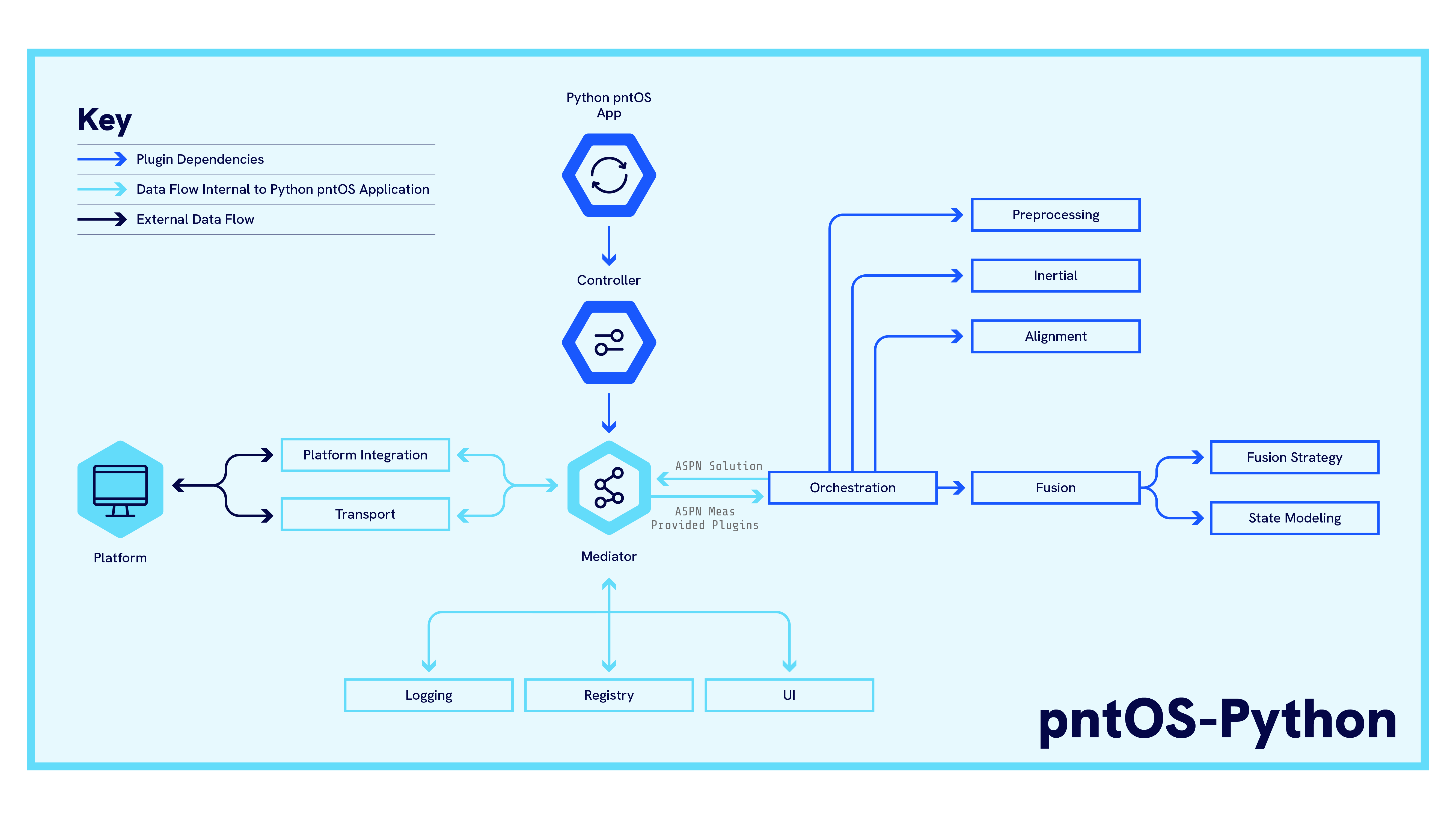
Notice that the App starts the Controller Plugin, which
then hands a Mediator to all the other plugins which
controls the flow of data through the system. Data comes into the system from the platform through
Transport Plugins (or for more specialized cases, the
Platform Integration plugin) which then pass data on
to the Orchestration Plugin.
The Orchestration Plugin can optionally incorporate other plugins to implement a sensor fusion filter. These optional plugins include:
Fusion Plugin: Used by the Orchestration Plugin to generate a sensor fusion engine. The Orchestration Plugin can use components from the following plugins to assemble the fusion engine.
Fusion Strategy Plugin: Provides an estimation strategy to the fusion engine.
State Modeling Plugin: Keeps track of states and how measurements should update those states.
Inertial Plugin: Performs mechanization for an IMU.
Initialization Plugin: Performs any filter initialization (e.g. implementing an IMU alignment strategy).
Preprocessor Plugin: Performs any preprocessing of data before it reaches the filter (e.g. performing sensor-to-platform frame rotations).
Additionally, all plugins have access to the Registry Plugin and Logging Plugin via the mediator.
Other plugins such as the UI Plugin,
Platform Integration plugin, or the Utility
Plugin optionally provide the system with expanded
capabilities.
See the below pages for descriptions of various plugins, as well as any related components:
- ControllerPlugin
- Fusion Plugin
- Fusion Strategy Plugin
- Cobra EKF Strategy Plugin
- Inertial Plugin
- Initialization Plugin
- Logging Plugin
- Orchestration Plugin
- Preprocessor Plugin
- Registry Plugin
- State Modeling Plugin
- Transport Plugin
- UI Plugin
- Utility Plugin